
DP-100 · Question #518
Drag and Drop Question You design a project for interactive data wrangling with Apache Spark in an Azure Machine Learning workspace. The data pipeline must provide the following solution: - Ingest…
The correct answer is Attached Synapse Spark pool; Serverless Spark compute. This question tests the understanding of appropriate Azure Spark compute options for different data wrangling activities within Azure Machine Learning, distinguishing between large-scale, ongoing processes and small-scale, ad-hoc tasks.
Question
Exhibit
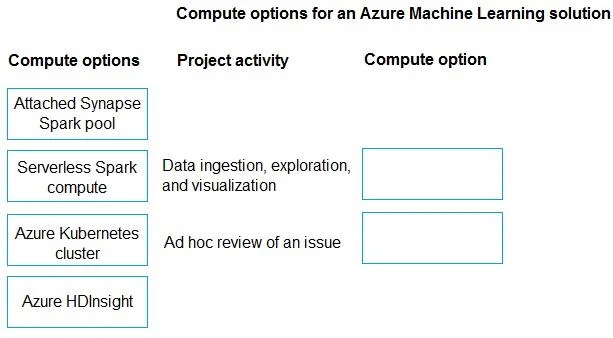
Answer Area
Drag items
Correct arrangement
- Attached Synapse Spark pool
- Serverless Spark compute
Explanation
This question tests the understanding of appropriate Azure Spark compute options for different data wrangling activities within Azure Machine Learning, distinguishing between large-scale, ongoing processes and small-scale, ad-hoc tasks.
Approach. 1. For 'Data ingestion, exploration, and visualization', which involves processing a 'vast amount of data' and preparing for Power BI, the 'Attached Synapse Spark pool' is the most suitable choice. Azure Synapse Analytics provides dedicated Apache Spark pools optimized for large-scale data processing, interactive data wrangling, and integration with a modern data warehouse or data lake strategy, making it ideal for robust and scalable data pipelines. 2. For 'Ad hoc review of an issue', which requires observing 'a small amount of data using the fewest resources', the 'Serverless Spark compute' is the correct option. This managed Spark compute in Azure Machine Learning is designed for quick, on-demand execution of Spark jobs, starting up rapidly and scaling automatically. It's cost-effective for short, exploratory tasks or debugging, as you only pay for the compute used during the execution of the notebook or script, aligning perfectly with the 'fewest resources' and 'quickly identify issues' requirements.
Common mistakes.
- common_mistake. Using 'Azure Kubernetes cluster' (AKS) for these Spark activities would be incorrect because while Spark can technically run on Kubernetes, AKS is primarily used in Azure ML for deploying models, running custom containerized workloads, or complex ML pipelines, not typically for interactive Spark data wrangling or ad-hoc analysis directly through notebooks in the most optimized or cost-effective way compared to dedicated Spark services. 'Azure HDInsight' is also a less optimal choice; while it supports Spark, it's a managed Hadoop service that generally involves provisioning and managing a persistent cluster, making it less agile and potentially more expensive for interactive or ad-hoc tasks within Azure ML compared to Synapse Spark or serverless options. Swapping the two correct answers would also be wrong; using Serverless Spark for vast data ingestion would be inefficient and costly over time, and using a Synapse Spark pool for a quick, small ad-hoc review would be overkill and less cost-effective than the serverless option.
Concept tested. This question tests the understanding of various Azure compute options for Apache Spark, specifically within the context of Azure Machine Learning, and their appropriate use cases based on scalability, cost-efficiency, interactivity, and resource requirements (e.g., large-scale pipelines vs. ad-hoc analysis).
Reference. null
Topics
Community Discussion
No community discussion yet for this question.