
DP-100 · Question #509
Drag and Drop Question You create an Azure Machine Learning workspace. You are training a classification model with no-code AutoML in Azure Machine Learning studio. The model must predict if a…
The correct answer is Create a tabular dataset.; Create a compute cluster.; Create an experiment.; Create an automated ML job. The correct sequence for training a no-code AutoML classification model in Azure Machine Learning involves preparing tabular data, provisioning compute resources, creating an experiment, and then launching an automated ML job.
Question
Exhibit
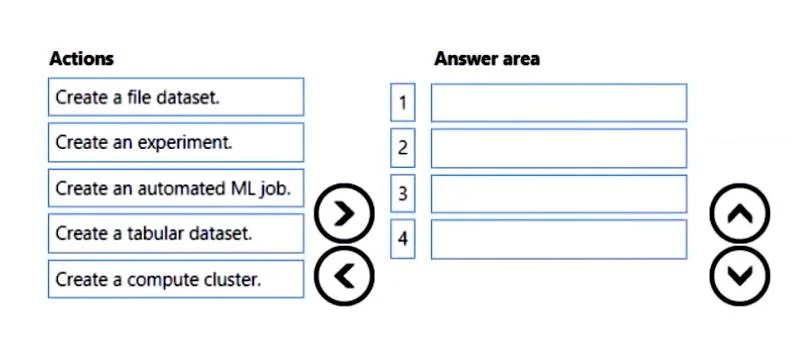
Answer Area
Drag items
Correct arrangement
- Create a tabular dataset.
- Create a compute cluster.
- Create an experiment.
- Create an automated ML job.
Explanation
The correct sequence for training a no-code AutoML classification model in Azure Machine Learning involves preparing tabular data, provisioning compute resources, creating an experiment, and then launching an automated ML job.
Approach. The scenario requires training a classification model using no-code AutoML on financial client data to predict fixed-term deposit subscriptions. This implies structured, tabular data. The steps for an Azure Machine Learning workflow, particularly for AutoML, follow a logical sequence:
-
Create a tabular dataset.: The first step is always to prepare and make the data available. Since the problem describes structured data for a classification task ('predict if a client... will subscribe'), a tabular dataset is the appropriate choice in Azure Machine Learning to store and manage this data. The requirement to 'preview the data profile' also aligns with tabular datasets.
-
Create a compute cluster.: Model training, especially with AutoML, is a compute-intensive task. A compute cluster provides the scalable processing power required to run the training job efficiently. This resource must be provisioned before the training job can commence.
-
Create an experiment.: In Azure Machine Learning, an 'experiment' often serves as a logical container or a high-level definition for one or more machine learning runs or jobs. While a specific 'automated ML job' will be created, the 'experiment' can be seen as setting the context or the project scope before launching the specific automated training task within it. This step helps organize and track different training efforts.
-
Create an automated ML job.: This is the direct action to initiate the no-code AutoML training process. Once the tabular data is ready, the compute cluster is available, and the experiment context is established, you configure and launch the automated ML job, specifying the dataset, target column, task type (classification), and compute target to automatically train and find the best model.
Common mistakes.
- common_mistake. A common mistake would be to choose 'Create a file dataset' instead of 'Create a tabular dataset'. The scenario describes a classification task on financial client data, which is typically structured and best handled by a tabular dataset, not a file dataset (which is more for unstructured data like images or text files). Another mistake is an incorrect order. For example, trying to 'Create an automated ML job' before 'Create a tabular dataset' or 'Create a compute cluster' would fail, as the job would lack necessary data to train on or resources to execute. Creating an 'experiment' after an 'automated ML job' would also be illogical, as the experiment conceptually encapsulates the job.
Concept tested. The core concept tested is the foundational workflow and sequence of operations for performing no-code Automated Machine Learning (AutoML) in Azure Machine Learning Studio, including data preparation, compute provisioning, and job orchestration.
Topics
Community Discussion
No community discussion yet for this question.