
DP-100 · Question #352
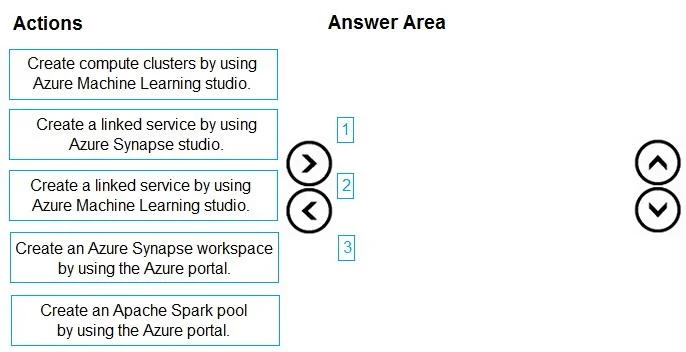
Drag and Drop Question You create an Azure Machine Learning workspace. You must implement dedicated compute for model training in the workspace by using Azure Synapse compute resources. The solution…
The correct answer is Create an Azure Synapse workspace by using the Azure portal.; Create an Apache Spark pool by using the Azure portal.; Create a linked service by using Azure Machine Learning studio. The correct sequence of actions involves provisioning Azure Synapse resources (workspace and Spark pool) first, then creating a linked service in Azure Machine Learning to connect to and utilize these Synapse compute resources for model training.
Question
Exhibit
Answer Area
Drag items
Correct arrangement
- Create an Azure Synapse workspace by using the Azure portal.
- Create an Apache Spark pool by using the Azure portal.
- Create a linked service by using Azure Machine Learning studio.
Explanation
The correct sequence of actions involves provisioning Azure Synapse resources (workspace and Spark pool) first, then creating a linked service in Azure Machine Learning to connect to and utilize these Synapse compute resources for model training.
Approach. The correct interaction requires dragging the three specific actions into the answer area and ordering them sequentially to establish Azure Synapse compute for Azure Machine Learning:
- Create an Azure Synapse workspace by using the Azure portal. This is the foundational step. Before any Synapse-specific compute resources (like Spark pools) can be used, the overarching Azure Synapse workspace must be provisioned in the Azure portal.
- Create an Apache Spark pool by using the Azure portal. Once the Synapse workspace exists, the next step is to create the actual distributed compute resource-an Apache Spark pool-within that workspace. This Spark pool will serve as the dedicated compute for Azure ML training.
- Create a linked service by using Azure Machine Learning studio. Finally, to enable the Azure Machine Learning workspace to 'attach' and utilize the newly created Azure Synapse Spark pool, a linked service must be established from within the Azure Machine Learning studio. This connection allows ML experiments to discover and run on the Synapse Spark compute, fulfilling the requirement to 'attach the dedicated compute' and implicitly allowing a Synapse session to start when jobs run.
Common mistakes.
- common_mistake. Common mistakes include selecting actions that do not directly address the problem or choosing the wrong sequence:
- 'Create compute clusters by using Azure Machine Learning studio.' This option is incorrect because the question specifically requires using 'Azure Synapse compute resources,' not Azure Machine Learning's native compute clusters (which are typically VM-based clusters).
- 'Create a linked service by using Azure Synapse studio.' While Azure Synapse Studio also uses linked services, creating one from Synapse Studio would typically connect Synapse to other services or data sources (e.g., for data ingestion or publishing ML models from Synapse). For Azure Machine Learning to consume Synapse compute, the linked service must be initiated from the Azure Machine Learning studio.
- Incorrect ordering of chosen steps: For example, attempting to create an Apache Spark pool before the Azure Synapse workspace itself is created would be impossible. Similarly, trying to create the Azure ML linked service before the Synapse workspace and Spark pool are provisioned would result in an error as there would be no resource to link to.
Concept tested. Integration of Azure Machine Learning with Azure Synapse Analytics for distributed machine learning, provisioning of Azure Synapse workspaces and Apache Spark pools, and the use of Azure Machine Learning linked services to connect to external compute resources.
Topics
Community Discussion
No community discussion yet for this question.