
DP-100 · Question #248
You create an Azure Machine Learning workspace named ML-workspace. You also create an Azure Databricks workspace named DB-workspace. DB-workspace contains a cluster named DB-cluster. You must use…
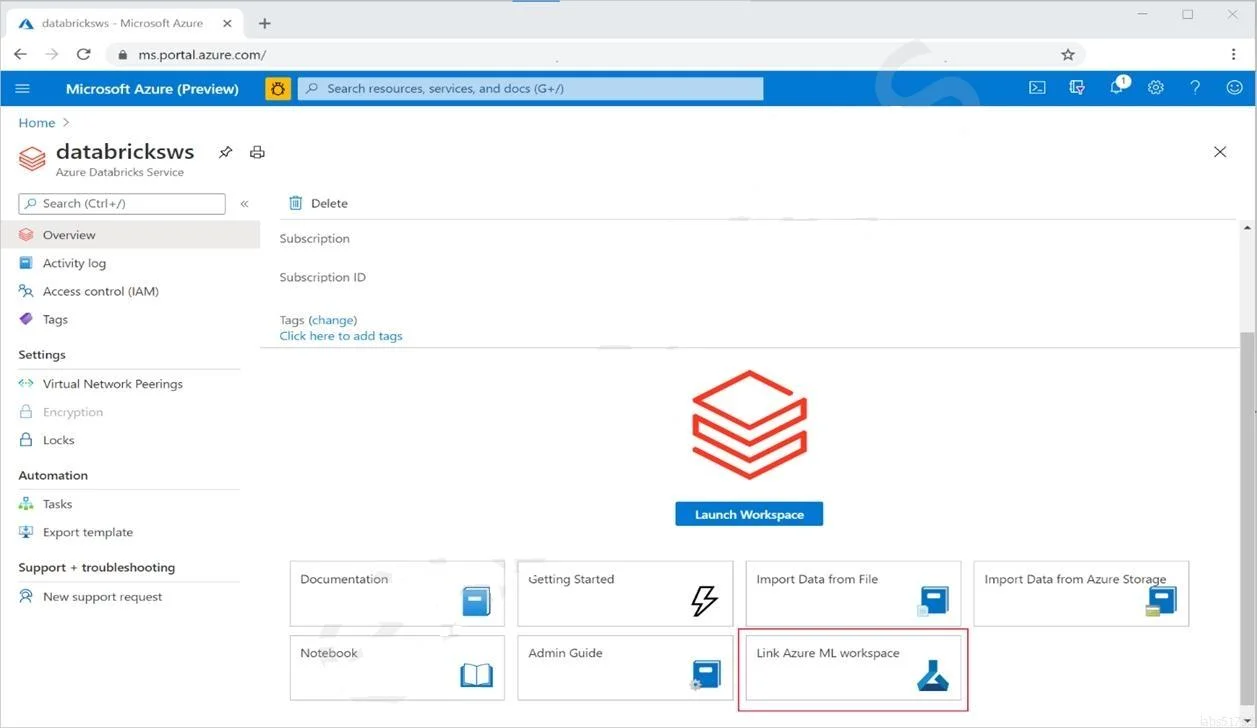
The correct answer is B. From DB-workspace, configure the Link Azure ML workspace option. Linking the Azure Databricks workspace to the Azure ML workspace (using the 'Link Azure ML workspace' option from DB-workspace settings) automatically configures the Databricks MLflow tracking URI to point to the Azure ML workspace's tracking server. Once linked, any MLflow…
Question
Exhibit
Options
- AFrom DB-cluster, configure the Advanced Logging option.
- BFrom DB-workspace, configure the Link Azure ML workspace option.
- CFrom ML-workspace, create an attached compute.
- DFrom ML-workspace, create a compute cluster.
How the community answered
(60 responses)- A2% (1)
- B93% (56)
- C2% (1)
- D3% (2)
Explanation
Linking the Azure Databricks workspace to the Azure ML workspace (using the 'Link Azure ML workspace' option from DB-workspace settings) automatically configures the Databricks MLflow tracking URI to point to the Azure ML workspace's tracking server. Once linked, any MLflow calls in notebooks running on DB-cluster are captured in ML-workspace with no custom tracking code required. Option A (Advanced Logging) enables Databricks-internal logging, not Azure ML integration. Option C (creating attached compute in ML-workspace) registers a Databricks cluster as compute for Azure ML pipelines-different from MLflow experiment tracking. Option D (compute cluster) is for Azure ML managed training, unrelated to Databricks MLflow tracking.
Topics
Community Discussion
No community discussion yet for this question.