
DP-100 · Question #193
You write a Python script that processes data in a comma-separated values (CSV) file. You plan to run this script as an Azure Machine Learning experiment. The script loads the data and determines…
The correct answer is B. run.log(`row_count', rows). Log a numerical or string value to the run with the given name using log(name, value, description=''). Logging a metric to a run causes that metric to be stored in the run record in the experiment. You can log the same metric multiple times within a run, the result being…
Question
Exhibit
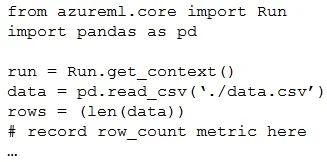
Options
- Arun.upload_file(
row_count',./data.csv') - Brun.log(`row_count', rows)
- Crun.tag(`row_count', rows)
- Drun.log_table(`row_count', rows)
- Erun.log_row(`row_count', rows)
How the community answered
(35 responses)- A3% (1)
- B91% (32)
- C6% (2)
Explanation
Log a numerical or string value to the run with the given name using log(name, value, description=''). Logging a metric to a run causes that metric to be stored in the run record in the experiment. You can log the same metric multiple times within a run, the result being considered a vector of that Example: run.log("accuracy", 0.95) Incorrect Answers: E: Using log_row(name, description=None, **kwargs) creates a metric with multiple columns as described in kwargs. Each named parameter generates a column with the value specified. log_row can be called once to log an arbitrary tuple, or multiple times in a loop to generate a Example: run.log_row("Y over X", x=1, y=0.4) https://docs.microsoft.com/en-us/python/api/azureml-core/azureml.core.run
Topics
Community Discussion
No community discussion yet for this question.