
DP-100 · Question #145
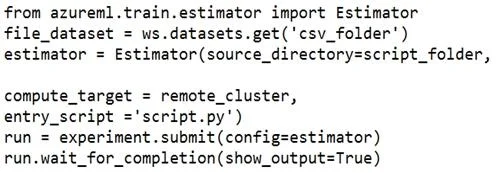
You register a file dataset named csv_folder that references a folder. The folder includes multiple comma-separated values (CSV) files in an Azure storage blob container. You plan to use the…
The correct answer is B. inputs=[file_dataset.as_named_input('training_files').as_mount()]. inputs=[file_dataset.as_named_input('training_files').as_mount()] is correct because .as_mount() mounts the file dataset's blob folder as a local path on the compute target, allowing the script to read individual files using standard file I/O. The script then accesses the mount…
Question
Exhibit
Options
- Ainputs=[file_dataset.as_named_input('training_files')],
- Binputs=[file_dataset.as_named_input('training_files').as_mount()],
- Cinputs=[file_dataset.as_named_input('training_files').to_pandas_dataframe ()],
- Dscript_params={'--training_files': file_dataset},
How the community answered
(17 responses)- A6% (1)
- B82% (14)
- D12% (2)
Explanation
inputs=[file_dataset.as_named_input('training_files').as_mount()] is correct because .as_mount() mounts the file dataset's blob folder as a local path on the compute target, allowing the script to read individual files using standard file I/O. The script then accesses the mount path via run.input_datasets['training_files']. Option A omits .as_mount(), so the dataset is passed as a named input reference but no local mount path is created for file access. Option C uses .to_pandas_dataframe() which is only valid for tabular datasets, not file datasets. Option D uses script_params which passes raw argument values and does not set up the proper dataset mounting mechanism.
Topics
Community Discussion
No community discussion yet for this question.