
DP-100 · Question #137
You create a datastore named training_data that references a blob container in an Azure Storage account. The blob container contains a folder named csv_files in which multiple comma- separated…
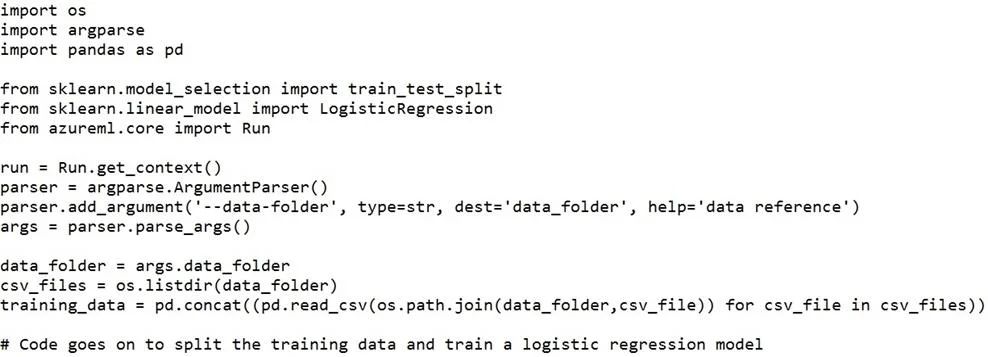
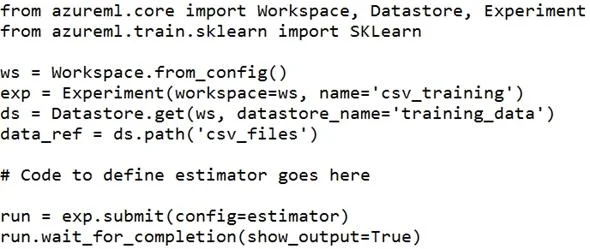
The correct answer is B. script_params = { '--data-folder': data_ref.as_mount() } estimator = SKLearn(source_directory='./script', script_params=script_params, compute_target='local', entry_script='train.py'). Besides passing the dataset through the inputs parameter in the estimator, you can also pass the dataset through script_params and get the data path (mounting point) in your training script via arguments. This way, you can keep your training script independent of azureml-sdk…
Question
Exhibits


Options
- Aestimator = SKLearn(source_directory='./script', inputs=[data_ref.as_named_input('data-folder').to_pandas_dataframe()], compute_target='local', script_params={}, entry_script='train.py')
- Bscript_params = { '--data-folder': data_ref.as_mount() } estimator = SKLearn(source_directory='./script', script_params=script_params, compute_target='local', entry_script='train.py')
- Cestimator = SKLearn(source_directory='./script', inputs=[data_ref.as_named_input('data-folder').as_mount()], compute_target='local', entry_script='train.py')
- Dscript_params = { '--data-folder': data_ref.as_download(path_on_compute='csv_files') } estimator = SKLearn(source_directory='./script', script_params=script_params, compute_target='local', entry_script='train.py')
- Eestimator = SKLearn(source_directory='./script', inputs=[data_ref.as_named_input('data-folder').as_download(path_on_compute='csv_files')], compute_target='local', entry_script='train.py')
How the community answered
(19 responses)- A5% (1)
- B79% (15)
- D11% (2)
- E5% (1)
Explanation
Besides passing the dataset through the inputs parameter in the estimator, you can also pass the dataset through script_params and get the data path (mounting point) in your training script via arguments. This way, you can keep your training script independent of azureml-sdk. In other words, you will be able use the same training script for local debugging and remote training on any cloud platform. from azureml.train.sklearn import SKLearn script_params = { # mount the dataset on the remote compute and pass the mounted path as an argument to the '--data-folder': mnist_ds.as_named_input('mnist').as_mount(), '--regularization': 0.5 est = SKLearn(source_directory=script_folder, script_params=script_params, compute_target=compute_target, environment_definition=env, entry_script='train_mnist.py') # Run the experiment run = experiment.submit(est) run.wait_for_completion(show_output=True) Incorrect Answers: A: Pandas DataFrame not used. https://docs.microsoft.com/es-es/azure/machine-learning/how-to-train-with-datasets
Topics
Community Discussion
No community discussion yet for this question.