
DOP-C02 · Question #274
A company's development team uses AWS CloudFormation to deploy its application resources. The team must use CloudFormation for all changes to the environment. The team cannot use the AWS Management…
The correct answer is A. Remove the AdministratorAccess policy. Assign the ReadOnlyAccess managed IAM policy to the D. Update the trust policy of the CloudFormationDeployment role to allow the F. Add an IAM policy to the CloudFormationDeployment role to allow cloudformation:* on all. Explanation This question tests your understanding of least privilege IAM principles combined with CloudFormation service roles. Option A is correct because removing AdministratorAccess and replacing it with ReadOnlyAccess ensures developers can view resources but cannot make…
Question
A company's development team uses AWS CloudFormation to deploy its application resources. The team must use CloudFormation for all changes to the environment. The team cannot use the AWS Management Console or the AWS CLI to make manual changes directly. The team uses a developer IAM role to access the environment. The role is configured with the AdministratorAccess managed IAM policy. The company has created a new CloudFormationDeployment IAM role that has the following policy attached:
The company wants to ensure that only CloudFormation can use the new role. The development team cannot make any manual changes to the deployed resources. Which combination of steps will meet these requirements? (Choose three.)
Exhibit
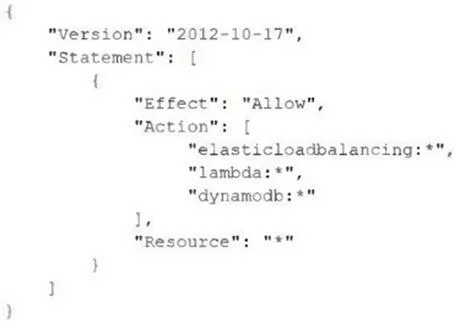
Options
- ARemove the AdministratorAccess policy. Assign the ReadOnlyAccess managed IAM policy to the
- BUpdate the trust policy of the CloudFormationDeployment role to allow the developer IAM role to
- CConfigure the developer IAM role to be able to get and pass the CloudFormationDeployment role
- DUpdate the trust policy of the CloudFormationDeployment role to allow the
- ERemove the AdministratorAccess policy. Assign the ReadOnlyAccess managed IAM policy to the
- FAdd an IAM policy to the CloudFormationDeployment role to allow cloudformation:* on all
How the community answered
(28 responses)- A50% (14)
- B18% (5)
- C25% (7)
- E7% (2)
Explanation
Explanation
This question tests your understanding of least privilege IAM principles combined with CloudFormation service roles. Option A is correct because removing AdministratorAccess and replacing it with ReadOnlyAccess ensures developers can view resources but cannot make manual changes directly. Option D is correct because the CloudFormationDeployment role's trust policy must explicitly allow the CloudFormation service principal (cloudformation.amazonaws.com) to assume the role, ensuring only CloudFormation can use it - not individual developers. Option F is correct because the CloudFormationDeployment role needs cloudformation:* permissions to actually perform stack operations on behalf of the service.
Why the distractors are wrong:
- B is wrong because allowing the developer IAM role to assume the CloudFormationDeployment role would let developers bypass CloudFormation and make changes directly using elevated permissions.
- C is wrong because while passing a role (
iam:PassRole) to CloudFormation is necessary, simply getting and passing the role doesn't restrict manual changes without the other controls in place - and this alone doesn't satisfy the trust boundary requirement. - E appears to be a duplicate/variant of A with an incorrect configuration and would not properly enforce the restriction.
Memory Tip: Think "RAP" - Restrict the developer (ReadOnly), Allow CloudFormation via the trust policy, Permit CloudFormation actions on the deployment role. Service roles always need the service principal in the trust policy, not the human role.
Topics
Community Discussion
No community discussion yet for this question.