
DEA-C02 · Question #28
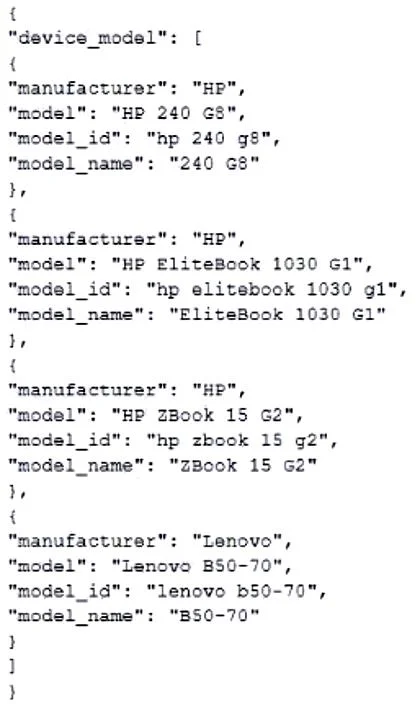
A Data Engineer has created table t1 with one column c1 with datatype VARIANT: create or replace table t1 (c1 variant); The Engineer has loaded the following JSON data set, which has information…
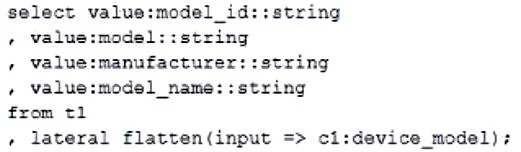
The correct answer is B. Select value:model_id::string , value:model::string , value:manufacturer::string , value:model_name::string from t1 , lateral flatten(input => c1:device_model). This question tests knowledge of Snowflake's LATERAL FLATTEN function to expand a nested JSON array stored in a VARIANT column, along with proper field extraction and type casting to produce clean relational output.
Question
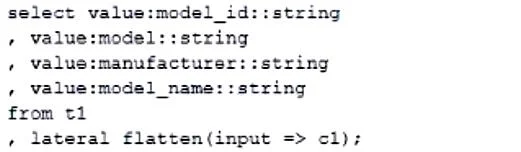
A Data Engineer has created table t1 with one column c1 with datatype VARIANT: create or replace table t1 (c1 variant); The Engineer has loaded the following JSON data set, which has information about 4 laptop models, into the table. The Engineer now wants to query that data set so that results are shown as normal structured data. The result should be 4 rows and 4 columns, without the double quotes surrounding the data elements in the JSON data. The result should be similar to the use case where the data was selected from a normal relational table t2, where t2 has string data type columns model_id, model, manufacturer, and model_name, and is queried with the SQL clause select * from t2; Which select command will produce the correct results? A. B. C. D.
Exhibits
Options
- ASelect value:model_id::string , value:model::string , value:manufacturer::string , value:model_name::string from t1 , lateral flatten(input => c1);
- BSelect value:model_id::string , value:model::string , value:manufacturer::string , value:model_name::string from t1 , lateral flatten(input => c1:device_model);
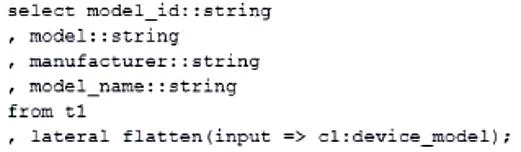
- Cselect model_id::string , model::string , manufacturer::string , model_name::string from t1 , lateral flatten(input => c1:device_model);
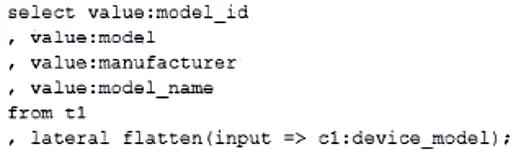
- Dselect value:model_id , value:model , value:manufacturer , value:model_name from t1 , lateral flatten(input => c1:device_model);
How the community answered
(19 responses)- A11% (2)
- B79% (15)
- C5% (1)
- D5% (1)
Why each option
This question tests knowledge of Snowflake's LATERAL FLATTEN function to expand a nested JSON array stored in a VARIANT column, along with proper field extraction and type casting to produce clean relational output.
Option A uses 'lateral flatten(input => c1)' which flattens the top-level VARIANT object rather than the nested 'device_model' array, so it would not produce 4 individual laptop rows from the inner array.
Option B is correct because the JSON structure stores the laptop records inside a nested array under the key 'device_model', so 'lateral flatten(input => c1:device_model)' correctly navigates to and expands that array into individual rows. The 'value:field_name' syntax properly extracts each field from the flattened array element, and the '::string' cast removes the double quotes that Snowflake displays for VARIANT string values, producing the clean 4-row by 4-column relational output required.
Option C omits the required 'value:' prefix when referencing fields after a LATERAL FLATTEN - without 'value:', column names like 'model_id' are not valid references in the flattened output context and the query would fail or return nulls.
Option D correctly references 'c1:device_model' and uses 'value:field' syntax, but omits the '::string' type cast, which means string fields will be returned as VARIANT type and will include surrounding double quotes, failing the requirement for clean unquoted output.
Concept tested: Snowflake LATERAL FLATTEN with VARIANT type casting
Source: https://docs.snowflake.com/en/user-guide/querying-semistructured-data
Topics
Community Discussion
No community discussion yet for this question.