
DEA-C02 · Question #137
A company has loaded the following JSON data into the table and needs assistance CAR_SALES loading the data into a dimension. VEHICLE_DIM Which query will load the data into a VEHICLE_DIM? A. B. C. D.
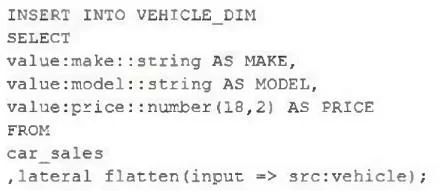
The correct answer is A. INSERT INTO VEHICLE_DIM SELECT value:make::string AS MAKE, value:model::string AS MODEL, value:price::number(18,2) AS PRICE FROM car_sales ,lateral flatten(input => src:vehicle). The CAR_SALES table stores JSON with a 'vehicle' array. LATERAL FLATTEN(input => src:vehicle) (A) expands each element of the vehicle array into a row, allowing extraction of make, model, and price using the variant path notation (value:make::string, etc.). This is exactly what…
Question
Exhibits
Options
- AINSERT INTO VEHICLE_DIM SELECT value:make::string AS MAKE, value:model::string AS MODEL, value:price::number(18,2) AS PRICE FROM car_sales ,lateral flatten(input => src:vehicle);
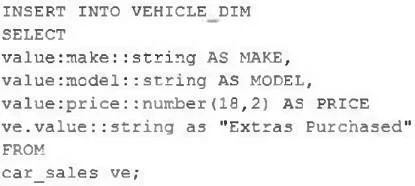
- BINSERT INTO VEHICLE_DIM SELECT value:make::string AS MAKE, value:model::string AS MODEL, value:price::number(18,2) AS PRICE ve.value::string as "Extras Purchased" FROM car_sales ve;
- CINSERT INTO VEHICLE_DIM SELECT value:make::string AS MAKE, value:model::string AS MODEL, value:price::number(18,2) AS PRICE FROM car_sales ,lateral flatten(input => src:vehicle) vm , lateral flatten(input => vm.value:extras) ve;
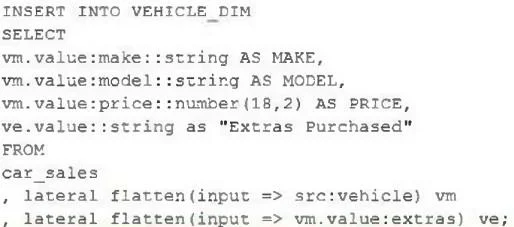
- DINSERT INTO VEHICLE_DIM SELECT VM.value:make::string AS MAKE, VM.value:model::string AS MODEL, VM.value:price::number(18,2) AS PRICE, ve.value::string as "Extras Purchased" FROM car_sales , lateral flatten (input => src:vehicle) vm , lateral flatten (input => vm.value:extras) ve;
How the community answered
(61 responses)- A77% (47)
- B3% (2)
- C13% (8)
- D7% (4)
Explanation
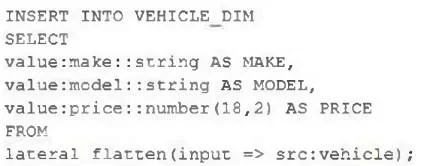
The CAR_SALES table stores JSON with a 'vehicle' array. LATERAL FLATTEN(input => src:vehicle) (A) expands each element of the vehicle array into a row, allowing extraction of make, model, and price using the variant path notation (value:make::string, etc.). This is exactly what VEHICLE_DIM requires - one row per vehicle. Option B tries to reference 've.value' without any FLATTEN clause, so 've' is undefined and the query would fail. Option C does a double FLATTEN - first on the vehicle array and then on an extras sub-array - which would cross-join vehicle rows with extras rows, producing more rows than needed and duplicating vehicle records. Option D also does the double FLATTEN and additionally selects 've.value' for extras, which is appropriate for an extras fact table but not for VEHICLE_DIM.
Topics
Community Discussion
No community discussion yet for this question.