
DEA-41T1 · Question #54
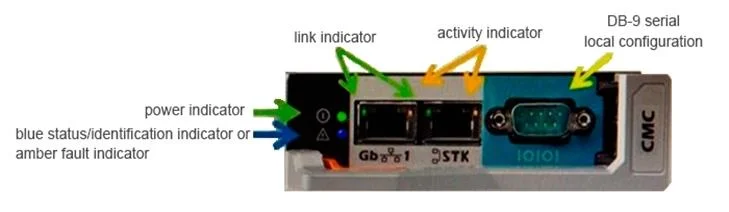
Refer to the exhibit. An administrator has a standalone M1000e chassis with only a single CMC module. The CAT6 cable is plugged into the Ethernet port closest to the DB-9 connector. The power…
The correct answer is C. CAT6 cable into the stacking port. Each CMC has two RJ-45 Ethernet ports, labeled GB (the uplink port) and STK (the stacking or cable consolidation port). With basic cabling, you can connect the GB port to the management network and leave the STK port unused.CAUTION: Connecting the STK port to the management…
Question
Refer to the exhibit. An administrator has a standalone M1000e chassis with only a single CMC module. The CAT6 cable is plugged into the Ethernet port closest to the DB-9 connector. The power indicator light is lit but the administrator is unable to access the CMC module. What could be the cause of this issue?
Exhibit
Options
- ANo DB-9 serial cable is plugged in
- BCMC module was removed without powering off the chassis
- CCAT6 cable into the stacking port
- DCAT5 cable is required for connection to CMC
How the community answered
(27 responses)- A4% (1)
- B11% (3)
- C81% (22)
- D4% (1)
Explanation
Each CMC has two RJ-45 Ethernet ports, labeled GB (the uplink port) and STK (the stacking or cable consolidation port). With basic cabling, you can connect the GB port to the management network and leave the STK port unused.CAUTION: Connecting the STK port to the management network can have unpredictable results. Cabling GB and STK to the same network (broadcast domain) can cause a broadcast storm.
Topics
Community Discussion
No community discussion yet for this question.