
DATABRICKS-CERTIFIED-ASSOCIATE-DEVELOPER-FOR-APACHE-SPARK · Question #6
Which of the following code blocks returns a DataFrame where column storeCategory from DataFrame storesDF is split at the underscore character into column storeValueCategory and column…
The correct answer is C. (storesDF.withColumn("storeValueCategory", split(col("storeCategory"), "_")[0]). The split() function in PySpark (from pyspark.sql.functions) takes a Column object and a delimiter string, and returns an array column. Array elements are accessed with 0-based integer indexing using square brackets. To get the first element (before the underscore), use index…
Question
Which of the following code blocks returns a DataFrame where column storeCategory from DataFrame storesDF is split at the underscore character into column storeValueCategory and column storeSizeCategory? A sample of DataFrame storesDF is displayed below:
Exhibit
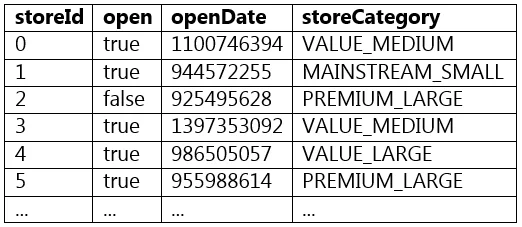
Options
- A(storesDF.withColumn("storeValueCategory", split(col("storeCategory"), "_")[1])
- B(storesDF.withColumn("storeValueCategory", col("storeCategory").split("_")[0])
- C(storesDF.withColumn("storeValueCategory", split(col("storeCategory"), "_")[0])
- D(storesDF.withColumn("storeValueCategory", split("storeCategory", "_")[0])
- E(storesDF.withColumn("storeValueCategory", col("storeCategory").split("_")[1])
How the community answered
(64 responses)- A5% (3)
- C81% (52)
- D11% (7)
- E3% (2)
Explanation
The split() function in PySpark (from pyspark.sql.functions) takes a Column object and a delimiter string, and returns an array column. Array elements are accessed with 0-based integer indexing using square brackets. To get the first element (before the underscore), use index [0]. Option C - split(col("storeCategory"), "_")[0] - is correct for extracting the first part. Option A uses index [1] (the second element), which would give storeSizeCategory, not storeValueCategory. Options B and E incorrectly call .split() as a method on a Column object, which is not a valid PySpark API. Option D passes a plain string to split() instead of a Column object.
Topics
Community Discussion
No community discussion yet for this question.