
DA0-001 · Question #279
A data analyst is performing a data merge within a spreadsheet using the tables below: The analyst is attempting to pull the addresses from Table 2 into Table 1 using the last names and is receiving…
The correct answer is D. Review the spelling and data type. When using lookup functions (such as VLOOKUP or INDEX/MATCH) to merge tables on a text key like last names, errors most commonly arise from spelling discrepancies (e.g., 'Smith' vs. 'smith' or 'Smyth') or data type mismatches (e.g., a field stored as text vs. a number). These…
Question
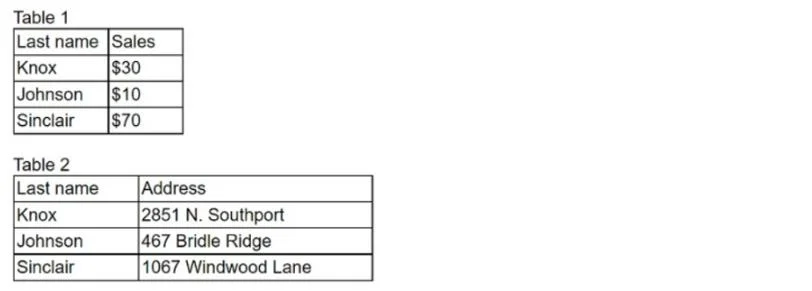
A data analyst is performing a data merge within a spreadsheet using the tables below:
The analyst is attempting to pull the addresses from Table 2 into Table 1 using the last names and is receiving an error message. Which of the following steps can the analyst perform to fix the error?
Exhibit
Options
- AUse concatenate to combine the tables.
- BEnsure the formula is pulling from right to left.
- CSort the data by the last name field.
- DReview the spelling and data type.
How the community answered
(51 responses)- A2% (1)
- B8% (4)
- C12% (6)
- D78% (40)
Explanation
When using lookup functions (such as VLOOKUP or INDEX/MATCH) to merge tables on a text key like last names, errors most commonly arise from spelling discrepancies (e.g., 'Smith' vs. 'smith' or 'Smyth') or data type mismatches (e.g., a field stored as text vs. a number). These cause the formula to fail to find a match and return an error. Concatenating (A) combines data but doesn't fix a lookup. Lookup functions work left-to-right by design (B is incorrect). Sorting (C) is not required for most modern lookup functions. Reviewing spelling and data types directly addresses the root cause of match failures.
Topics
Community Discussion
No community discussion yet for this question.