
CV0-003 · Question #873
A systems administrator is troubleshooting a VDI deployment that is used to run high-frame-rate rendering. Users are reporting frequent application crashes. After running a benchmark, the…
The correct answer is C. Select a higher vGPU profile. Selecting a higher vGPU profile allocates more GPU memory and compute resources per virtual machine, resolving crashes caused by GPU resource exhaustion during high-frame-rate rendering.
Question
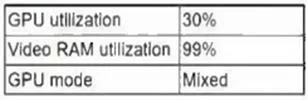
A systems administrator is troubleshooting a VDI deployment that is used to run high-frame-rate rendering. Users are reporting frequent application crashes. After running a benchmark, the administrator discovers the following:
Which of the following should the administrator do to resolve this issue?
Exhibit
Options
- AConfigure the GPU to run in compute mode.
- BAllocate more RAM in the VM template.
- CSelect a higher vGPU profile.
- DConfigure the GPU to run in graphics mode.
How the community answered
(46 responses)- A7% (3)
- B11% (5)
- C80% (37)
- D2% (1)
Why each option
Selecting a higher vGPU profile allocates more GPU memory and compute resources per virtual machine, resolving crashes caused by GPU resource exhaustion during high-frame-rate rendering.
GPU compute mode (CUDA-only or compute-exclusive mode) is designed for scientific computing and AI/ML workloads, not for graphical rendering pipelines, and would likely worsen rendering application crashes.
Allocating more RAM addresses CPU-side memory pressure, not GPU resource limitations - the benchmark context points to GPU resource exhaustion as the cause of the crashes.
In a VDI environment, vGPU profiles define the amount of GPU frame buffer memory and compute capacity assigned to each virtual machine. High-frame-rate rendering is GPU-intensive and requires substantial VRAM - an undersized profile causes the GPU to be oversubscribed, leading to application instability and crashes. Selecting a higher vGPU profile increases per-VM resource allocation, directly addressing the root cause identified by the benchmark.
Graphics mode is already the appropriate GPU mode for rendering workloads - the issue is insufficient resource allocation within that mode, not the mode configuration itself.
Concept tested: vGPU profile selection for VDI graphics workloads
Source: https://docs.nvidia.com/grid/latest/grid-vgpu-user-guide/index.html
Topics
Community Discussion
No community discussion yet for this question.