
CV0-003 · Question #535
A web server has been deployed in a public IaaS provider and has been assigned the public IP address of 72.135.10.100. Users are now reporting that when they browse to the website, they receive a…
The correct answer is D. Update the gateway on the web server to use 72.135.10.1. A web server with a valid public IP returning service unavailable errors most likely has a misconfigured or missing default gateway, preventing it from routing responses back to clients.
Question
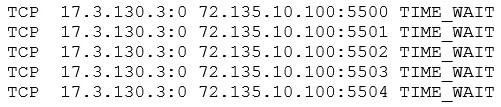
A web server has been deployed in a public IaaS provider and has been assigned the public IP address of 72.135.10.100. Users are now reporting that when they browse to the website, they receive a message indicating the service is unavailable. The cloud administrator logs into the server, runs a netstat command, and notices the following relevant output:
Which of the following actions should the cloud administrator take to resolve the issue?
Exhibit
Options
- AAssign a new IP address of 192.168.100.10 to the web server
- BModify the firewall on 72.135.10.100 to allow only UDP
- CConfigure the WAF to filter requests from 17.3.130.3
- DUpdate the gateway on the web server to use 72.135.10.1
How the community answered
(22 responses)- A9% (2)
- B18% (4)
- C5% (1)
- D68% (15)
Why each option
A web server with a valid public IP returning service unavailable errors most likely has a misconfigured or missing default gateway, preventing it from routing responses back to clients.
Assigning a private RFC 1918 address like 192.168.100.10 would remove the server from public internet reachability entirely, making the problem worse rather than resolving it.
HTTP and HTTPS rely on TCP, not UDP, so restricting the firewall to allow only UDP traffic would completely break web service access.
Configuring the WAF to filter a specific source IP would only block that one client and does not address the underlying routing issue causing the service to be unavailable.
The default gateway at 72.135.10.1 is the required next-hop router for the web server to send return traffic to clients outside its subnet. Without a correct gateway, the server can receive inbound TCP SYN packets but cannot route SYN-ACK responses, causing connections to fail and the service to appear unavailable even though the server process itself may be running.
Concept tested: Default gateway misconfiguration in cloud IaaS networking
Source: https://docs.aws.amazon.com/vpc/latest/userguide/VPC_Route_Tables.html
Topics
Community Discussion
No community discussion yet for this question.