
CNX-001 · Question #19
Application development team users are having issues accessing the database server within the cloud environment. All other users are able to use SSH to access this server without issues. The network…
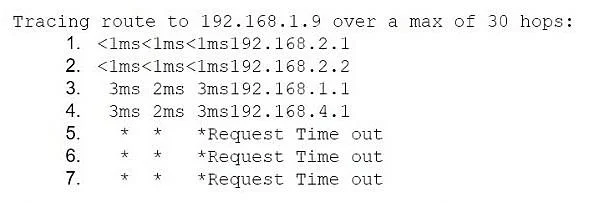
The correct answer is C. The server segment firewall is dropping the traffic. The traceroute from 192.168.2.7 reaches the server-segment gateway (192.168.1.1) and then the server-segment firewall (192.168.4.1), but never progresses to the database's subnet. That indicates the firewall at 192.168.4.1 is blocking or not forwarding packets to 192.168.1.9.
Question
Application development team users are having issues accessing the database server within the cloud environment. All other users are able to use SSH to access this server without issues. The network architect reviews the following information to troubleshoot the issue:
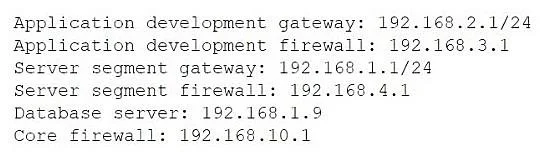
IPAM information:
Traceroute output from an application developer's machine with the assigned IP 192.168.2.7:
Which of the following is the most likely cause of the issue?
Exhibits
Options
- AThe core firewall is blocking the traffic.
- BNetwork security groups do not have the correct outbound rule configured.
- CThe server segment firewall is dropping the traffic.
- DThe server segment gateway is having bandwidth issues.
How the community answered
(51 responses)- A2% (1)
- B10% (5)
- C82% (42)
- D6% (3)
Explanation
The traceroute from 192.168.2.7 reaches the server-segment gateway (192.168.1.1) and then the server-segment firewall (192.168.4.1), but never progresses to the database's subnet. That indicates the firewall at 192.168.4.1 is blocking or not forwarding packets to 192.168.1.9.
Topics
Community Discussion
No community discussion yet for this question.