
CKS · Question #60
Context You must implement auditing for the kubeadm provisioned cluster. Task First, reconfigure the cluster 's API server, so that: . the basic audit policy located at…
To implement Kubernetes API server auditing, the test-taker must modify the kube-apiserver static pod manifest on the master node to enable auditing flags and hostPath volumes, then create/update the audit policy file with the specified rules in the correct order.
Question
Exhibits
Explanation
To implement Kubernetes API server auditing, the test-taker must modify the kube-apiserver static pod manifest on the master node to enable auditing flags and hostPath volumes, then create/update the audit policy file with the specified rules in the correct order.
Approach. The correct approach involves two main phases: reconfiguring the API server and then defining the audit policy.
Phase 1: Reconfigure Kubernetes API Server on the Master Node
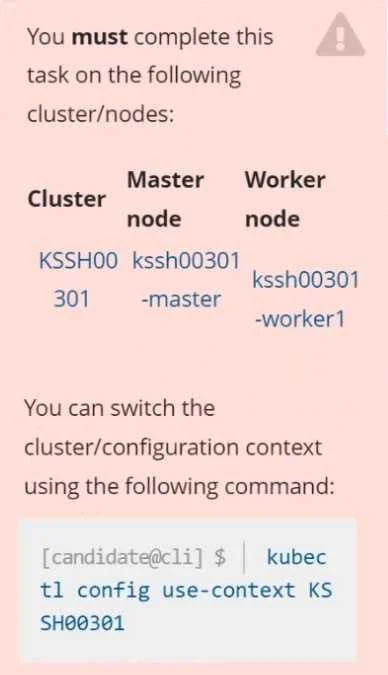
- Access the Master Node: SSH into
kssh00301-masteras specified in the exhibit. Thekubectl config use-context KSSH00301command is for localkubectlcontext, but the task requires direct modification on the master node. - Locate API Server Manifest: The
kube-apiserverruns as a static pod managed by kubelet. Its manifest file is typically located at/etc/kubernetes/manifests/kube-apiserver.yaml. - Edit
kube-apiserver.yaml: Open this file with a text editor (e.g.,viornano). - Add Audit Flags: Under
spec.containers[0].command, add the following flags:--audit-policy-file=/etc/kubernetes/logpolicy/audit-policy.yaml--audit-log-path=/var/log/kubernetes/audit-logs.txt--audit-log-maxage=10--audit-log-maxbackup=2
- Add HostPath Volumes: To allow the static pod to access the policy file and write logs to the host, add
volumesunderspecandvolumeMountsunderspec.containers[0]:- For policy file:
# In spec.containers[0].volumeMounts - mountPath: /etc/kubernetes/logpolicy/audit-policy.yaml name: audit-policy-volume readOnly: true subPath: audit-policy.yaml # In spec.volumes - hostPath: path: /etc/kubernetes/logpolicy type: DirectoryOrCreate name: audit-policy-volume - For log directory:
# In spec.containers[0].volumeMounts
- mountPath: /var/log/kubernetes
  name: audit-log-volume
# In spec.volumes
- hostPath:
    path: /var/log/kubernetes
    type: DirectoryOrCreate
  name: audit-log-volume
- For policy file:
- Save and Verify: Save the
kube-apiserver.yamlfile. Kubelet will automatically detect the change and restart thekube-apiserverpod. Verify its status (e.g.,docker ps | grep kube-apiserver).
Phase 2: Edit and Extend the Audit Policy File
- Create/Edit Policy File: Ensure the directory
/etc/kubernetes/logpolicyexists (sudo mkdir -p /etc/kubernetes/logpolicy). Then, create or modify the file/etc/kubernetes/logpolicy/audit-policy.yaml. - Define Audit Rules: The audit policy is a YAML file with
apiVersion: audit.k8s.io/v1andkind: Policy. Rules are evaluated in order; the first matching rule applies. The new rules must be placed at the beginning of therulesarray, before any existing generallevel: Nonerules from the 'basic policy'.apiVersion: audit.k8s.io/v1 kind: Policy # The basic policy might have top-level omitStages or general 'None' rules. # New specific rules must come first. rules: # 1. Namespaces interactions at RequestResponse level - level: RequestResponse resources: - group: "" resources: ["namespaces"] # 2. Request body of deployments interactions in the namespace webapps - level: Request resources: - group: "apps" resources: ["deployments"] namespaces: ["webapps"] # 3. ConfigMap and Secret interactions in all namespaces at the Metadata level - level: Metadata resources: - group: "" resources: ["configmaps", "secrets"] # 4. All other requests at the Metadata level (catch-all) - level: Metadata # If the basic policy includes a top-level 'omitStages' that would conflict with this, # it might need to be overridden or carefully placed. Generally, 'Metadata' level # implies logging RequestReceived and ResponseComplete stages with only metadata. # Existing 'basic policy' rules (which 'only specifies what not to log') would follow here, e.g.: - level: None users: ["system:kube-proxy"] verbs: ["watch"] resources: - group: "" resources: ["endpoints", "services"] # ... other rules from the basic policy. - Verify Logs: After the API server restarts and the policy is in place, commands like
tail -f /var/log/kubernetes/audit-logs.txtshould show the new audit entries according to the defined rules.
Common mistakes.
- common_mistake. Common mistakes include:
- Incorrect Master Node: Attempting to modify configuration on a worker node instead of the master node (
kssh00301-master). The API server only runs on the master. - Typos or YAML Syntax Errors: Incorrect flags or malformed YAML in
kube-apiserver.yamloraudit-policy.yamlcan prevent the API server from starting or applying the policy. - Missing Volumes/VolumeMounts: Forgetting to add
hostPathvolumes andvolumeMountsfor the policy file and log directory will prevent the API server pod from reading the policy or writing logs. - Incorrect Audit Policy Rule Order: Audit rules are evaluated sequentially. Placing more general rules (e.g.,
level: Noneor a catch-allMetadatarule) before more specific rules can cause the specific rules to be ignored. - Incorrect
levelfor audit rules: UsingMetadatawhenRequestResponseorRequestis required (e.g., for 'request body' for deployments,Requestlevel is needed) or vice-versa. - Incorrect Resource Groups: Specifying
resources: ["deployments"]withoutgroup: "apps"orresources: ["namespaces"]withoutgroup: "". - Not creating directories: If
/etc/kubernetes/logpolicyor/var/log/kubernetesdon't exist, the API server might fail to start or log errors.
Concept tested. This question primarily tests the understanding of Kubernetes API server auditing, including:
- How to configure the Kubernetes API server (a static pod) by modifying its manifest (
/etc/kubernetes/manifests/kube-apiserver.yaml). - The specific API server flags for audit logging (
--audit-policy-file,--audit-log-path,--audit-log-maxage,--audit-log-maxbackup). - The use of
hostPathvolumes andvolumeMountsto enable static pods to access host filesystems. - The structure and components of a Kubernetes Audit Policy (
apiVersion,kind,rules,level,resources,group,namespaces,verbs,omitStages). - The importance of audit policy rule order for effective filtering and logging.
Reference. null
Topics
Community Discussion
No community discussion yet for this question.