CKS · Question #40
CKS Question #40: Real Exam Question with Answer & Explanation
To address the API server CIS benchmark violations, the user must first switch the kubectl context to the specified cluster, then connect to the master node to modify the API server's static pod manifest file to correctly configure the authorization modes to 'Node,RBAC', and save
Question
You can switch the cluster/configuration context using the following command: [desk@cli] $ kubectl config use-context dev Context: A CIS Benchmark tool was run against the kubeadm created cluster and found multiple issues that must be addressed. Task: Fix all issues via configuration and restart the affected components to ensure the new settings take effect. Fix all of the following violations that were found against the API server: 1.2.7 authorization-mode argument is not set to AlwaysAllow FAIL 1.2.8 authorization-mode argument includes Node FAIL 1.2.7 authorization-mode argument includes RBAC FAIL Fix all of the following violations that were found against the Kubelet:
Explanation
To address the API server CIS benchmark violations, the user must first switch the kubectl context to the specified cluster, then connect to the master node to modify the API server's static pod manifest file to correctly configure the authorization modes to 'Node,RBAC', and save the changes for the API server to automatically restart.
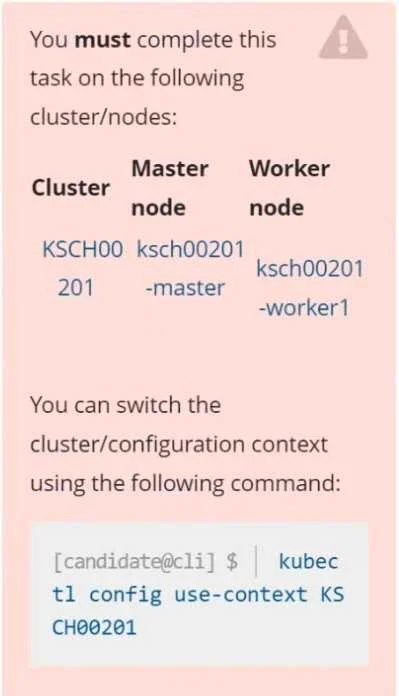
Approach. 1. Context Switch (from image instruction): The first and explicit interaction mandated by the exhibit image is to execute the command kubectl config use-context KSCH00201 in the provided terminal environment. This ensures that all subsequent kubectl commands are directed at the correct cluster. This step is foundational as the task is specific to the 'KSCH00201' cluster.
2. Identify Master Node: The task specifies violations against the API server. The Kubernetes API server runs on the master node. Therefore, the next logical step (though not directly shown as an interactive element in the image) is to gain access to the ksch00201-master node, likely via SSH if the exam environment simulates multiple nodes or directly through the main CLI if it's a single point of interaction for the master.
3. Locate API Server Configuration: On kubeadm-initialized clusters, the Kubernetes API server is typically deployed as a static pod. Its configuration is defined in a manifest file, usually located at /etc/kubernetes/manifests/kube-apiserver.yaml on the master node.
4. Edit API Server Manifest: Open /etc/kubernetes/manifests/kube-apiserver.yaml using a text editor (e.g., vi or nano). Locate the command section where the API server arguments are defined. The task requires fixing the --authorization-mode argument. The violations indicate that Node and RBAC are missing, and AlwaysAllow is either present or incorrectly absent (depending on CIS benchmark version interpretation, but security best practice dictates not using AlwaysAllow). To meet the secure benchmark requirements, the --authorization-mode argument should be set to Node,RBAC. The exact line to modify or add would look like --authorization-mode=Node,RBAC within the command arguments list.
5. Save and Restart: Save the changes to the kube-apiserver.yaml file. Since the API server is a static pod, the Kubelet running on the master node monitors this directory. Upon detecting a change in the manifest file, Kubelet will automatically terminate the existing API server pod and launch a new one with the updated configuration, ensuring the new settings take effect without requiring manual service restarts.
Common mistakes.
- common_mistake. Common mistakes include failing to switch the
kubectlcontext as instructed, which would lead to commands being executed against the wrong cluster. Another mistake would be editing the incorrect configuration file or editing it on the wrong node (e.g., a worker node instead of the master). Incorrectly modifying the--authorization-modeargument, such as setting it toAlwaysAllow(which is generally insecure and often marked as a FAIL in benchmarks if not correctly omitted), or omittingNodeorRBAC, would fail to resolve the specified violations. Finally, not saving the changes or misunderstanding that static pods automatically restart upon manifest changes could lead to the task being incomplete.
Concept tested. Kubernetes API Server configuration, authorization modes (Node, RBAC, AlwaysAllow), CIS Benchmark compliance for Kubernetes, kubectl context management, static pods, and basic Linux file system navigation and editing.
Topics
Community Discussion
No community discussion yet for this question.