
Linux_Foundation
CKA · Question #26
Create 2 nginx image pods in which one of them is labelled with env=prod and another one labelled with env=dev and verify the same.
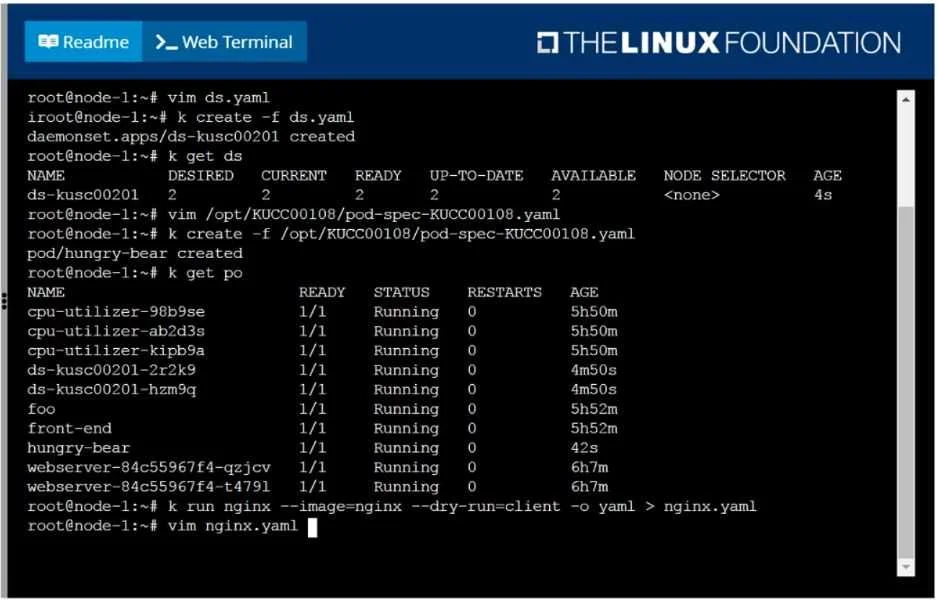
The test-taker must create two distinct Nginx Kubernetes Pods, one labeled 'env=prod' and the other 'env=dev', by modifying a generated YAML file twice and then applying it, finally verifying their creation and labels.
Submitted by anna_se· May 4, 2026Workloads and Scheduling
Question
Create 2 nginx image pods in which one of them is labelled with env=prod and another one labelled with env=dev and verify the same.
Exhibit
Explanation
The test-taker must create two distinct Nginx Kubernetes Pods, one labeled 'env=prod' and the other 'env=dev', by modifying a generated YAML file twice and then applying it, finally verifying their creation and labels.
Approach. The correct interaction involves the following steps:
- Modify YAML for the 'prod' pod: The
kubectl runcommand has already created a basicnginx.yamlfile. The test-taker must first open this file usingvim nginx.yaml.- Inside
vim, change the pod's name fromnginxto a unique name, e.g.,nginx-prod(undermetadata.name). - Add the
env: prodlabel under themetadata.labelssection. Thelabelssection should typically look like:metadata: labels: run: nginx env: prod name: nginx-prod - Save the changes and exit
vimusing:wq.
- Inside
- Create the 'prod' pod: Execute
kubectl create -f nginx.yamlto deploy the Nginx pod with the 'env=prod' label. - Modify YAML for the 'dev' pod: Re-open
nginx.yamlusingvim nginx.yaml.- Inside
vim, change the pod's name again to another unique name, e.g.,nginx-dev. - Change the
envlabel fromprodtodev.metadata: labels: run: nginx env: dev name: nginx-dev - Save the changes and exit
vimusing:wq.
- Inside
- Create the 'dev' pod: Execute
kubectl create -f nginx.yamlto deploy the Nginx pod with the 'env=dev' label. - Verify: Finally, execute
kubectl get pods --show-labelsto list all running pods along with their labels. This command will confirm that bothnginx-prod(withenv=prod) andnginx-dev(withenv=dev) pods are created and running as specified.
Common mistakes.
- common_mistake. 1. Not changing the pod name: A common mistake is not changing the
metadata.namefield when creating the second pod. Kubernetes Pod names must be unique within a namespace. If the samenginxname is used for both pods, the secondkubectl create -f nginx.yamlcommand will fail with an 'AlreadyExists' error.
- Incorrect YAML syntax or indentation: Misplacing the
labelssection or using incorrect YAML indentation can lead to syntax errors whenkubectl createattempts to parse the manifest, preventing pod creation. - Attempting to define two pods in a single YAML file without proper structure: A single Pod manifest defines one Pod. While a list of objects can be defined in YAML, for distinct pods with different labels, modifying and applying the YAML twice or using two separate files is the most straightforward approach. Incorrectly adding multiple pod definitions in a single file or using a Deployment (which typically creates replicas with identical labels) would not directly meet the requirement of two distinct pods with different
envlabels without further complexity. - Forgetting to verify: The question explicitly asks to 'verify the same'. Failing to run
kubectl get pods --show-labelsor a similar verification command (e.g.,kubectl get po -l env=prodandkubectl get po -l env=dev) would result in an incomplete solution.
Concept tested. This question tests the candidate's ability to create and manage Kubernetes Pods using YAML manifests, specifically focusing on:
- Understanding and applying labels to Kubernetes resources (
metadata.labels). - Using
kubectl run --dry-runto generate base YAML manifests. - Basic text editing skills with
vimto modify YAML files. - Using
kubectl create -fto deploy resources from YAML. - Understanding the requirement for unique resource names within a namespace.
- Verifying resource creation and properties using
kubectl getwith options like--show-labels.
Topics
#Pod Creation#Kubernetes Labels#Workloads#kubectl
Community Discussion
No community discussion yet for this question.