
CERTIFIED-DATA-ANALYST-ASSOCIATE · Question #45
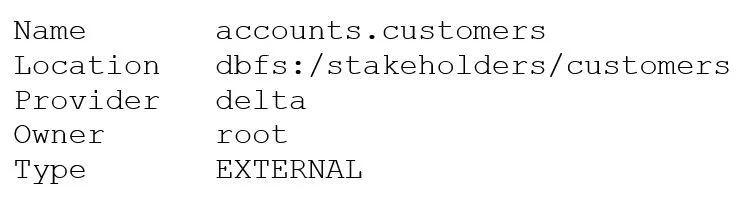
After running DESCRIBE EXTENDED accounts.customers;, the following was returned: Now, a data analyst runs the following command: DROP accounts.customers; Which of the following describes the result…
The correct answer is E. The accounts.customers table is removed from the metastore, but the underlying data files are. Option E is correct because DESCRIBE EXTENDED (implied by the question context) would reveal that accounts.customers is an external table - its data files live at a location outside Databricks' managed storage. When you DROP an external table, Databricks removes the table…
Question
After running DESCRIBE EXTENDED accounts.customers;, the following was returned:
Now, a data analyst runs the following command:
DROP accounts.customers; Which of the following describes the result of running this command?
Exhibit
Options
- ARunning SELECT * FROM delta.
dbfs:/stakeholders/customersresults in an error. - BRunning SELECT * FROM accounts.customers will return all rows in the table.
- CAll files with the .customers extension are deleted.
- DThe accounts.customers table is removed from the metastore, and the underlying data files are
- EThe accounts.customers table is removed from the metastore, but the underlying data files are
How the community answered
(26 responses)- A15% (4)
- B8% (2)
- C4% (1)
- D4% (1)
- E69% (18)
Explanation
Option E is correct because DESCRIBE EXTENDED (implied by the question context) would reveal that accounts.customers is an external table - its data files live at a location outside Databricks' managed storage. When you DROP an external table, Databricks removes the table definition from the metastore but deliberately leaves the underlying data files untouched at their registered location, preserving the data.
Why the distractors are wrong:
- A is wrong because the data files still exist after the drop; a
SELECTagainst the raw Delta path (delta....``) would still work. - B is wrong because the table entry is gone from the metastore -
SELECT * FROM accounts.customerswould throw a "table not found" error. - C is wrong because Databricks operates on Delta/Parquet files by directory/path, not by file extension; no
.customersextension exists. - D describes what happens when you drop a managed table (metastore entry + data files both deleted), which is the opposite behavior of an external table.
Memory tip: Think of external tables as "bring your own storage" - since you supplied the storage location, Databricks won't delete it when you drop the table. External = files stay. Managed = files go.
Community Discussion
No community discussion yet for this question.