
CCDAK · Question #171
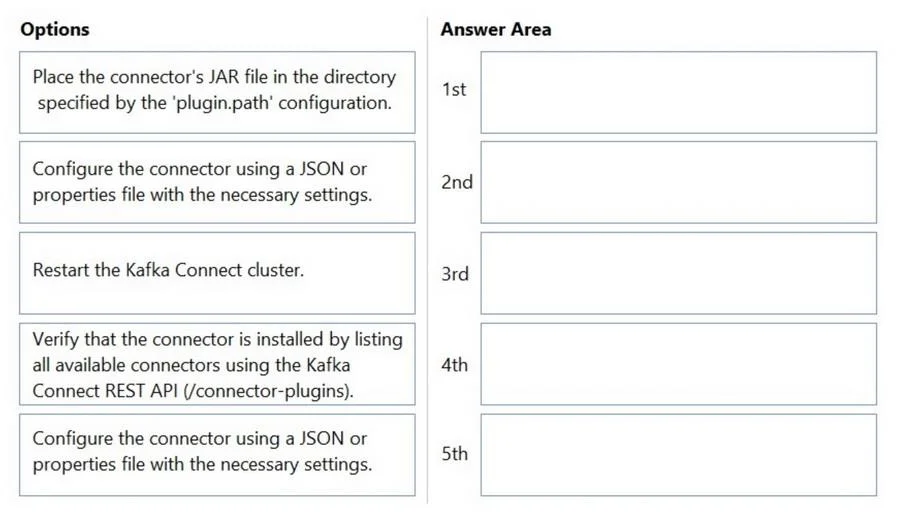
Drag and Drop Question Match each configuration parameter with the correct option. Please Move the tasks to the answer area and place them in the correct order. Answer:
The correct answer is Place the connector's JAR file in the directory specified by the 'plugin.path' configuration.; Restart the Kafka Connect cluster.; Verify that the connector is installed by listing all available connectors using the Kafka Connect REST API (/connector-plugins).; Configure the connector using a JSON or properties file with the necessary settings.; Configure the connector using a JSON or properties file with the necessary settings. Kafka Connect: Installing and Configuring a Connector This question asks you to order the steps for deploying a new connector plugin in Kafka Connect. Here's the correct workflow and why each step belongs where it does. --- Step 1 - Place the JAR in plugin.path Kafka Connect…
Question
Drag and Drop Question Match each configuration parameter with the correct option. Please Move the tasks to the answer area and place them in the correct order. Answer:
Exhibit
Answer Area
Drag items
Correct arrangement
- Place the connector's JAR file in the directory specified by the 'plugin.path' configuration.
- Restart the Kafka Connect cluster.
- Verify that the connector is installed by listing all available connectors using the Kafka Connect REST API (/connector-plugins).
- Configure the connector using a JSON or properties file with the necessary settings.
- Configure the connector using a JSON or properties file with the necessary settings.
Explanation
Kafka Connect: Installing and Configuring a Connector
This question asks you to order the steps for deploying a new connector plugin in Kafka Connect. Here's the correct workflow and why each step belongs where it does.
Step 1 - Place the JAR in plugin.path
Kafka Connect uses class isolation via the plugin.path configuration in connect-distributed.properties. The JAR must be on disk before anything else can happen - this is a prerequisite for all subsequent steps. Without the binary present, the worker has nothing to load.
Step 2 - Restart the Kafka Connect cluster
Kafka Connect scans plugin.path only at startup. It does not hot-reload plugins at runtime. Placing the JAR does nothing until the workers restart and re-discover the plugin directory. This is why restart comes before verification, not after.
Common mistake: Assuming you can deploy a JAR to a running cluster without restarting. This is false for self-managed Kafka Connect (unlike some managed services).
Step 3 - Verify via REST API (GET /connector-plugins)
Before writing any configuration, confirm the cluster actually loaded the plugin by calling:
GET http://<connect-host>:8083/connector-plugins
This returns the list of available connector classes. Verifying first saves you from debugging a failed connector deployment when the real issue is just a bad JAR path.
Step 4 & 5 - Configure the connector (×2)
Once the plugin is confirmed available, you instantiate a connector by POSTing a JSON config to /connectors:
{ "name": "my-connector", "config": { "connector.class": "...", ... } }
Note on the duplicate: Steps 4 and 5 are identical in this question, which appears to be an error. In practice, you would only do this once per connector instance - unless deploying two separate connectors using the same plugin.
Key Mental Model
Install plugin (JAR) → Restart workers → Verify plugin loaded → Deploy connector instance
The distinction between plugin (the JAR/class) and connector instance (a running configured task) is the core concept this question tests. You can't configure what isn't loaded, and you can't load what hasn't been discovered.
Topics
Community Discussion
No community discussion yet for this question.