
C2090-623 · Question #19
An administrator has a requirement to specify system-wide accessibility settings for all entries (reports, jobs and schedules). How can this be done?
The correct answer is D. In IBM Cognos Administration, click on "configuration" > dispatchers and services > click on "set. Enable Accessible Report Output Using System-wide Settings Accessible reports contain features, such as alternate text, that allow users with disabilities to access report content using assistive technologies, such as screen readers. In IBM Cognos Administration, you can…
Question
An administrator has a requirement to specify system-wide accessibility settings for all entries (reports, jobs and schedules). How can this be done?
Exhibit
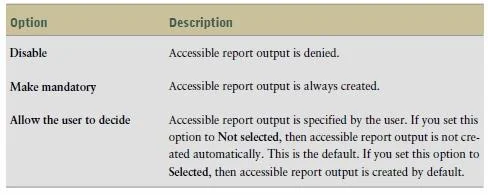
Options
- ANo action needed as the Administrator has access to all entries by default.
- BIn IBM Cognos Portal select all entries and change owner to Administrator.
- CIn IBM Cognos Administration, on the Deployment tab add a new deployment, select full Content
- DIn IBM Cognos Administration, click on "configuration" > dispatchers and services > click on "set
How the community answered
(27 responses)- A7% (2)
- B4% (1)
- C19% (5)
- D70% (19)
Explanation
Enable Accessible Report Output Using System-wide Settings Accessible reports contain features, such as alternate text, that allow users with disabilities to access report content using assistive technologies, such as screen readers. In IBM Cognos Administration, you can specify system-wide settings for accessible report output that apply to all entries, including reports, jobs, and scheduled entries. Accessibility settings in the user preferences and report properties can overwrite the system-wide settings in IBM Cognos Administration. 1. Start IBM Cognos Connection. 2. In the upper-right corner, click Launch, IBM Cognos Administration. 3. On the Configuration tab, click Dispatchers and Services. 4. From the toolbar in the upper-right corner of the page, click the set properties button . 5. Click the Settings tab. 6. Under Category, click Administrator Override. 7. For the Administrator Override category, next to Accessibility support for reports, in the Value column, click Edit. 8. In the Accessibility support for reports page, select one of the following options:
Topics
Community Discussion
No community discussion yet for this question.