
IBM
C2090-461 · Question #26
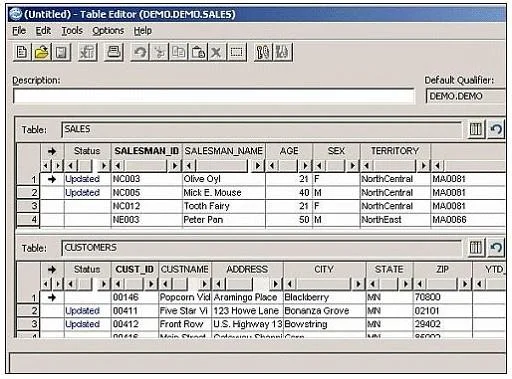
Click the Exhibit button. Using the Optim Editor as shown in the exhibit, you have made multiple changes on each of the updated rows in the SALES and CUSTOMERS tables. You now decide that you want…
The correct answer is C. Right-click on the row and choose "Undo? See the full explanation below for the reasoning.
Question
Click the Exhibit button. Using the Optim Editor as shown in the exhibit, you have made multiple changes on each of the updated rows in the SALES and CUSTOMERS tables. You now decide that you want to undo the last change to row 1 in SALES. What should you do?
Exhibit
Options
- ARight-click on the row and choose "Undo Row".
- BRight-click on the row and choose "Undo Change".
- CRight-click on the row and choose "Undo?.
- DRight-click on the row and choose "Undo All".
How the community answered
(50 responses)- A4% (2)
- B12% (6)
- C76% (38)
- D8% (4)
Community Discussion
No community discussion yet for this question.