
C2010-509 · Question #6
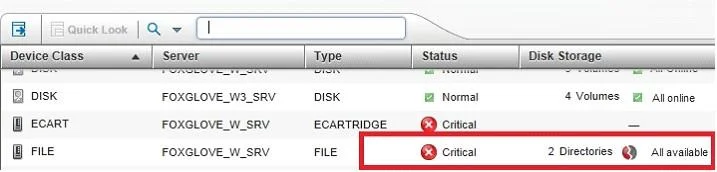
An alert represents an error message that is issued by an IBM Tivoli Storage Manager server. What does this icon mean when shown at the alert?
The correct answer is C. Critical: Processing cannot continue. The issue must be corrected immediately. Explanation/Reference: *The severity codes give an indication of the severity of the issue that generated the message. The severity codes and their meanings are as follows: E Error Processing cannot continue. W Warning Processing can continue, but problems may occur later. I…
Question
An alert represents an error message that is issued by an IBM Tivoli Storage Manager server. What does this icon mean when shown at the alert?
Exhibit
Options
- AWarning; Processing can continue, but problems might occur later.
- BSevere: Processing stops. The server will preempty the tasks and stop.
- CCritical: Processing cannot continue. The issue must be corrected immediately.
- DInfo: Processing continues with an informational message, and no action is required.
How the community answered
(33 responses)- A3% (1)
- B9% (3)
- C82% (27)
- D6% (2)
Explanation
Explanation/Reference: *The severity codes give an indication of the severity of the issue that generated the message. The severity codes and their meanings are as follows: E Error Processing cannot continue. W Warning Processing can continue, but problems may occur later. I Information Processing continues. User response is not necessary.
Topics
Community Discussion
No community discussion yet for this question.