
C100DBA · Question #29
Consider the following document from the products collection: What does the following query using $elemMatch return? db.products.find( { product_code: "345678" }, { variations: { $elemMatch: { size…
The correct answer is B. Returns the document but with only one element in the variations array (corresponding to size L). Option B is correct because $elemMatch used in a projection (the second argument to find()) acts as an array filter - it returns the matched document but limits the variations array to only the first element where size equals "L", not the entire array. Why the distractors are…
Question
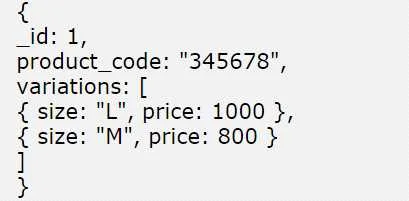
Consider the following document from the products collection:
What does the following query using $elemMatch return? db.products.find( { product_code:
"345678" }, { variations: { $elemMatch: { size: ^L^ } } } )
Exhibit
Options
- AReturns the complete document but retrieves only the size field from the array
- BReturns the document but with only one element in the variations array (corresponding to size L)
- CReturns the complete document since MongoDB does not support partial array retrieval
- DReturns the complete document but retrieves only the size field from the array and also with only
How the community answered
(32 responses)- A16% (5)
- B75% (24)
- C3% (1)
- D6% (2)
Explanation
Option B is correct because $elemMatch used in a projection (the second argument to find()) acts as an array filter - it returns the matched document but limits the variations array to only the first element where size equals "L", not the entire array.
Why the distractors are wrong:
- A & D are wrong because
$elemMatchin projection returns the entire matching array subdocument (all its fields like size, color, stock, etc.), not just thesizefield itself - that would require a nested$projectwith field selection. - C is simply false - MongoDB has multiple operators for partial array retrieval, including
$elemMatch,$slice, and the positional operator ($).
Memory tip: Distinguish $elemMatch by context - in a query filter (first argument), it matches documents where any array element meets all conditions; in a projection (second argument), it trims the returned array down to the first matching element. Think: filter → find the doc; project → trim the array.
Topics
Community Discussion
No community discussion yet for this question.