
C1000-065 · Question #45
DRAG DROP Select all that apply Place in order the steps that need to performed in order to set up a Multilingual Dashboard. Answer: Place dashboard in edit mode Set default language Add language…
The correct answer is A. Place dashboard in edit mode B. Add Language C. Set Default Language D. Enter Translated Strings. All four options are correct because setting up a Multilingual Dashboard requires every one of these steps - none can be skipped. The proper sequence is: (A) Place dashboard in edit mode → (C) Set Default Language → (B) Add Language → (D) Enter Translated Strings, since you…
Question
DRAG DROP Select all that apply Place in order the steps that need to performed in order to set up a Multilingual Dashboard. Answer:
Place dashboard in edit mode Set default language Add language Enter translated string
Exhibit
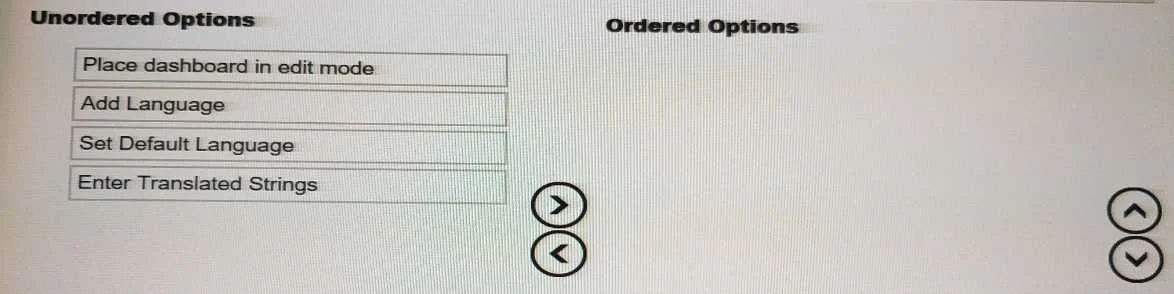
Options
- APlace dashboard in edit mode
- BAdd Language
- CSet Default Language
- DEnter Translated Strings
How the community answered
(18 responses)- A100% (18)
Explanation
All four options are correct because setting up a Multilingual Dashboard requires every one of these steps - none can be skipped. The proper sequence is: (A) Place dashboard in edit mode → (C) Set Default Language → (B) Add Language → (D) Enter Translated Strings, since you must first enable editing, establish a baseline language, then layer additional languages on top, and finally supply the actual translated text for each field.
Because this is a "select all that apply / place in order" question, there are no wrong distractors - every choice is a required step. The trap here is ordering: candidates who select all four but sequence them incorrectly (e.g., adding a language before setting the default) would still lose marks.
Memory tip: Use the acronym ESDAE - Edit → Set default → Add language → Enter translations - or think of it like building a house: you unlock the door first (edit mode), lay the foundation language (default), frame the new rooms (add language), then furnish them (enter strings).
Topics
Community Discussion
No community discussion yet for this question.