
AZ-801 · Question #8
You are planning the DHCP1 migration to support the DHCP migration plan. Which two PowerShell cmdlets should you run on DHCP1? And which two PowerShell cmdlets should you run on DHCP2? To answer…
To perform a DHCP server migration, the configuration must be exported from the source server (DHCP1) and imported to the destination server (DHCP2), and both servers' authorization status in Active Directory must be appropriately managed.
Question
Exhibit
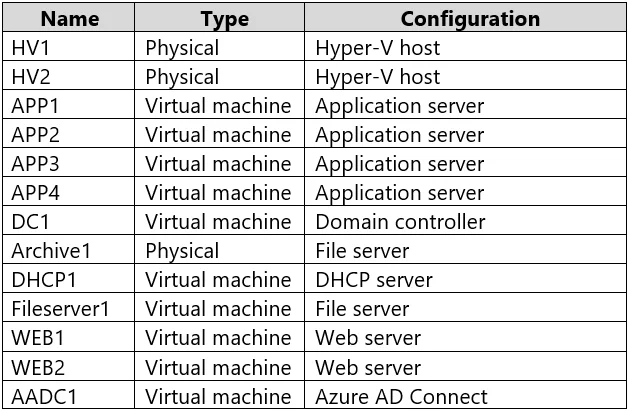
Explanation
To perform a DHCP server migration, the configuration must be exported from the source server (DHCP1) and imported to the destination server (DHCP2), and both servers' authorization status in Active Directory must be appropriately managed.
Approach. The DHCP migration plan requires moving the DHCP configuration and ensuring a smooth transition of service. This involves specific PowerShell cmdlets for the source server (DHCP1) and the destination server (DHCP2).
On DHCP1 (the source DHCP server), you should run:
Export-DhcpServer: This cmdlet is used to export the entire DHCP server configuration, including scopes, reservations, leases, and server settings, to an XML file. This is the first critical step to capture the existing configuration that will be moved to the new server.Remove-DhcpServerInDC: After the configuration is exported and before the new server takes over, the old DHCP server (DHCP1) must be deauthorized in Active Directory. This prevents the old server from attempting to issue IP addresses after the migration, which would cause conflicts with the new server. It ensures a clean cut-over.
On DHCP2 (the destination DHCP server), you should run:
Import-DhcpServer: This cmdlet is used to import the DHCP server configuration from the XML file that was exported from DHCP1. This command recreates all the scopes, reservations, and settings on the new DHCP2 server, effectively replicating the configuration.Add-DhcpServerInDC: Once the configuration is imported, the new DHCP server (DHCP2) must be authorized in Active Directory. Only authorized DHCP servers can serve IP addresses to clients in an Active Directory environment. This step enables DHCP2 to begin fulfilling DHCP requests.
Common mistakes.
- common_mistake. Common mistakes often involve incorrect cmdlet selection or sequence:
- Using only 'Stop-Service DhcpServer' on DHCP1 instead of 'Remove-DhcpServerInDC': While stopping the service is part of decommissioning, for a complete migration in an Active Directory environment, unauthorizing the server in AD (
Remove-DhcpServerInDC) is crucial to prevent potential conflicts and ensure the old server is fully out of play from an AD perspective. - Not using 'Add-DhcpServerInDC' on DHCP2: Simply starting the DHCP service after importing the configuration is not enough. Without authorizing the new server in Active Directory, it will not be able to lease IP addresses to clients on an AD domain, leading to service disruption.
- Using 'Remove-DhcpServer' on DHCP1: This cmdlet removes the DHCP server role entirely from the server, which is generally too aggressive for a migration plan where the server might be repurposed or if a rollback is needed.
Remove-DhcpServerInDCis more targeted for deauthorization. - Confusing 'Export-DhcpServer'/'Import-DhcpServer' with backup/restore features like 'Backup-DhcpServer'/'Restore-DhcpServer': While backup/restore are useful for disaster recovery on the same server, export/import are designed for migrating configurations between different DHCP servers.
Concept tested. The core concept being tested is the process of migrating a DHCP server, specifically using PowerShell cmdlets, including exporting and importing DHCP configurations, and managing DHCP server authorization/deauthorization within an Active Directory environment.
Topics
Community Discussion
No community discussion yet for this question.