
AZ-800 · Question #182
You have a server named Server1 that runs Windows Server and has the DHCP Server role installed. Server1 contains the following single scope: - Scope: 192.168.16.0 - Address pool…
The correct answer is D. Create an exclusion range. The four test devices use static IP addresses and are offline most of the time. Without intervention, DHCP could assign those same IPs to other clients when the test devices are offline, causing IP conflicts when the test devices come back online. Creating an exclusion range…
Question
You have a server named Server1 that runs Windows Server and has the DHCP Server role installed. Server1 contains the following single scope:
- Scope: 192.168.16.0
- Address pool: 192.168.16.1-192.168.16.254
- Subnet mask: 255.255.255.0
- Lease duration: 8 days
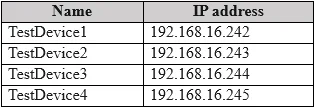
You have four testing devices that are configured with static IP addresses as shown in the following table. The test devices are turned on once a month. You need to prevent Server1 from assigning the IP addresses allocated to the test devices to other devices when the test devices are offline. The solution must minimize administrative effort. What should you do?
Exhibit
Options
- ACreate a policy.
- BCreate reservations.
- CConfigure the Scope options.
- DCreate an exclusion range.
How the community answered
(39 responses)- A5% (2)
- B15% (6)
- C5% (2)
- D74% (29)
Explanation
The four test devices use static IP addresses and are offline most of the time. Without intervention, DHCP could assign those same IPs to other clients when the test devices are offline, causing IP conflicts when the test devices come back online. Creating an exclusion range (D) removes those specific IP addresses from the pool of addresses DHCP will distribute, with minimal configuration - you simply exclude the IP range used by the static devices. This is simpler than creating reservations (B), which require each device's MAC address and are designed for DHCP-assigned (not statically configured) clients. A policy (A) is more complex and designed for conditional assignments. Scope options (C) configure settings like default gateway or DNS, not address assignment exclusions.
Topics
Community Discussion
No community discussion yet for this question.