
AZ-700 · Question #334
You have an Azure subscription that contains an Azure Front Door named FD1. FD1 is configured as shown in the following exhibit. You need to enable Azure Private Link for FD1. What should you do…
The correct answer is D. Change Pricing Tier to Azure Front Door Premium. To enable Azure Private Link for an Azure Front Door instance, the Front Door must first be provisioned with or upgraded to the Premium pricing tier.
Question
You have an Azure subscription that contains an Azure Front Door named FD1. FD1 is configured as shown in the following exhibit. You need to enable Azure Private Link for FD1. What should you do first?
Exhibit
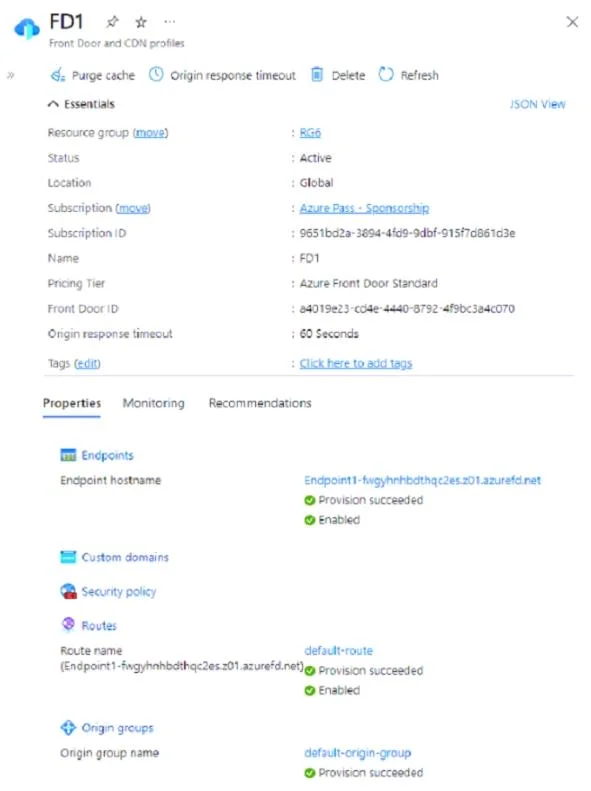
Options
- AAdd an endpoint.
- BCreate a custom route.
- CCreate an origin group.
- DChange Pricing Tier to Azure Front Door Premium.
How the community answered
(15 responses)- A13% (2)
- B7% (1)
- C7% (1)
- D73% (11)
Why each option
To enable Azure Private Link for an Azure Front Door instance, the Front Door must first be provisioned with or upgraded to the Premium pricing tier.
Adding an endpoint is a configuration step that occurs after Private Link is enabled or the service tier supports it, not the initial action to enable the feature itself.
Creating a custom route is for traffic routing within Front Door, but it is not a prerequisite for enabling the underlying Private Link functionality.
Creating an origin group is a standard configuration within Front Door to define backend resources, but it does not directly enable or prerequisite Private Link capabilities.
Azure Private Link support for origins is a feature exclusively available with the Azure Front Door Premium tier. To enable this functionality, the Front Door instance must first be upgraded to or provisioned with the Premium pricing tier, as the Standard tier does not support Private Link for origins.
Concept tested: Azure Front Door Private Link tier requirement
Source: https://learn.microsoft.com/en-us/azure/frontdoor/private-link
Community Discussion
No community discussion yet for this question.