
AZ-700 · Question #297
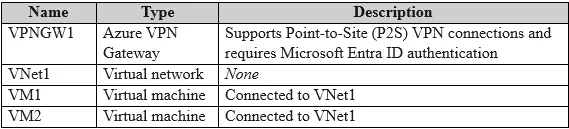
Your company has a remote office that contains a macOS device named Device1. Device1 has an IKEv2 VPN client installed. You have an Azure subscription that contains the resources shown in the…
The correct answer is B. On Device1, install the OpenVPN client. To ensure Device1, a macOS device with an IKEv2 VPN client, can connect to VNet1 via VPNGW1 with minimal administrative effort, the first step is to install the OpenVPN client on Device1.
Question
Your company has a remote office that contains a macOS device named Device1. Device1 has an IKEv2 VPN client installed. You have an Azure subscription that contains the resources shown in the following table. You need to ensure that Device1 can access the resources on VNet1 by using the VPN connections of VPNGW1. The solution must minimize administrative effort. What should you do first?
Exhibit
Options
- ATo VNet1, deploy a virtual machine that contains a RADIUS server.
- BOn Device1, install the OpenVPN client.
- COn Device1, add an X.509 certificate.
- DFrom Devices in the Microsoft Entra admin center, configure the Device settings.
How the community answered
(24 responses)- A4% (1)
- B71% (17)
- C8% (2)
- D17% (4)
Why each option
To ensure Device1, a macOS device with an IKEv2 VPN client, can connect to VNet1 via VPNGW1 with minimal administrative effort, the first step is to install the OpenVPN client on Device1.
Deploying a RADIUS server is an authentication method for VPNs, not the initial step to enable client connectivity or necessarily the method that minimizes administrative effort for a macOS device connecting to Azure P2S VPN.
Azure Point-to-Site (P2S) VPN supports the OpenVPN protocol, which simplifies client configuration for macOS devices because Azure generates a VPN client profile that can be directly imported into the OpenVPN client, minimizing administrative effort compared to manually configuring an IKEv2 client for Azure P2S.
Adding an X.509 certificate to Device1 is part of a certificate-based authentication setup for P2S VPN, but it does not address the overall simplification of client setup that installing the OpenVPN client provides for macOS devices with Azure P2S.
Configuring device settings in Microsoft Entra admin center is primarily for device management or Azure AD authentication for VPN, which is not the first or primary step for enabling basic P2S VPN connectivity for a macOS device in this scenario.
Concept tested: Azure P2S VPN client configuration for macOS
Source: https://learn.microsoft.com/en-us/azure/vpn-gateway/vpn-gateway-about-point-to-site-vpn
Community Discussion
No community discussion yet for this question.