
AZ-700 · Question #148
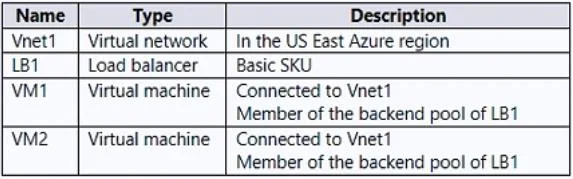
You have an Azure subscription that contains the resources shown in the following table. You create a virtual network named Vnet2 in the West US region. You plan to enable peering between Vnet1 and…
The correct answer is D. Change the SKU of LB1. Azure Basic Load Balancer does not support connectivity across VNet peering boundaries. When VMs in Vnet2 (a peered VNet) attempt to reach VM1 and VM2 through LB1, traffic fails if LB1 is Basic SKU because Basic Load Balancers are scoped to a single VNet and do not support…
Question
You have an Azure subscription that contains the resources shown in the following table. You create a virtual network named Vnet2 in the West US region. You plan to enable peering between Vnet1 and Vnet2. You need to ensure that the virtual machines connected to Vnet2 can connect to VM1 and VM2 via LB1. What should you do?
Exhibit
Options
- AFrom the Peerings settings of Vnet2, set Traffic forwarded from remote virtual network to Allow.
- BChange the Floating IP configurations of LB1.
- CFrom the Peerings settings of Vnet1, set Traffic forwarded from remote virtual network to Allow.
- DChange the SKU of LB1.
How the community answered
(51 responses)- A14% (7)
- B6% (3)
- C2% (1)
- D78% (40)
Explanation
Azure Basic Load Balancer does not support connectivity across VNet peering boundaries. When VMs in Vnet2 (a peered VNet) attempt to reach VM1 and VM2 through LB1, traffic fails if LB1 is Basic SKU because Basic Load Balancers are scoped to a single VNet and do not support global VNet peering or cross-VNet routing. Upgrading LB1 to Standard SKU resolves this - Standard Load Balancer supports cross-VNet peering traffic, including global (cross-region) peering. Options A and C ('Allow forwarded traffic') control whether traffic forwarded from another VNet is permitted, but that setting alone does not fix the SKU limitation. Option B (Floating IP) is unrelated to cross-VNet reachability.
Community Discussion
No community discussion yet for this question.