
AZ-700 · Question #129
You have an Azure virtual network named Vnet1 and an on-premises network. The on-premises network has policy-based VPN devices. In Vnet1, you deploy a virtual network gateway named GW1 that uses a…
The correct answer is D. Set IPsec / IKE policy to Custom. Previously, when working with policy-based VPNs, you were limited to using the policy-based VPN gateway Basic SKU and could only connect to 1 on-premises VPN/firewall device. Now, using custom IPsec/IKE policy, you can use a route-based VPN gateway and connect to multiple…
Question
You have an Azure virtual network named Vnet1 and an on-premises network. The on-premises network has policy-based VPN devices. In Vnet1, you deploy a virtual network gateway named GW1 that uses a SKU of VpnGw1 and is route-based. You have a Site-to-Site VPN connection for GW1 as shown in the following exhibit. You need to ensure that the on-premises network can connect to the route-based GW1. What should you do before you create the connection?
Exhibit
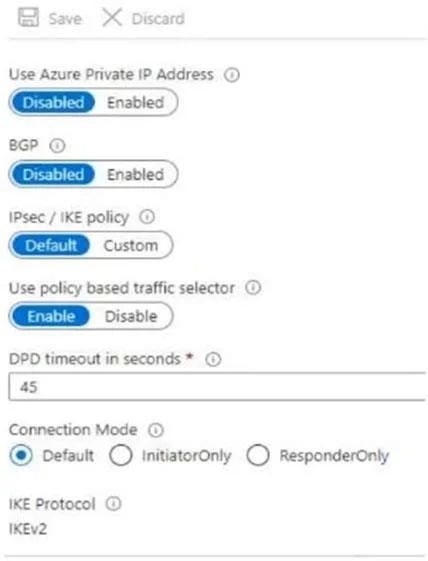
Options
- ASet Connection Mode to ResponderOnly.
- BSet BGP to Enabled.
- CSet Use Azure Private IP Address to Enabled.
- DSet IPsec / IKE policy to Custom.
How the community answered
(44 responses)- A2% (1)
- B7% (3)
- C14% (6)
- D77% (34)
Explanation
Previously, when working with policy-based VPNs, you were limited to using the policy-based VPN gateway Basic SKU and could only connect to 1 on-premises VPN/firewall device. Now, using custom IPsec/IKE policy, you can use a route-based VPN gateway and connect to multiple policy-based VPN/firewall devices. To make a policy-based VPN connection using a route-based VPN gateway, configure the route-based VPN gateway to use prefix-based traffic selectors with the option "PolicyBasedTrafficSelectors". https://learn.microsoft.com/en-us/azure/vpn-gateway/vpn-gateway-connect-multiple-policybased-
Community Discussion
No community discussion yet for this question.