
AZ-500 · Question #634
Drag and Drop Question Your network contains an on-premises Active Directory domain named contoso.com. The domain contains a user named User1. You have an Azure subscription that is linked to a…
The correct answer is Enable Active Directory Domain Services (AD DS) as an identity source for identity-based access.; Assign share-level permissions for share1.; Create a service endpoint to storage1. To enable User1 to access share1 using on-premises AD DS credentials, you must first enable AD DS as the identity source for Azure Files on storage1, which registers the storage account in the on-premises domain. Next, you assign share-level permissions (IAM roles like Storage…
Question
Exhibit
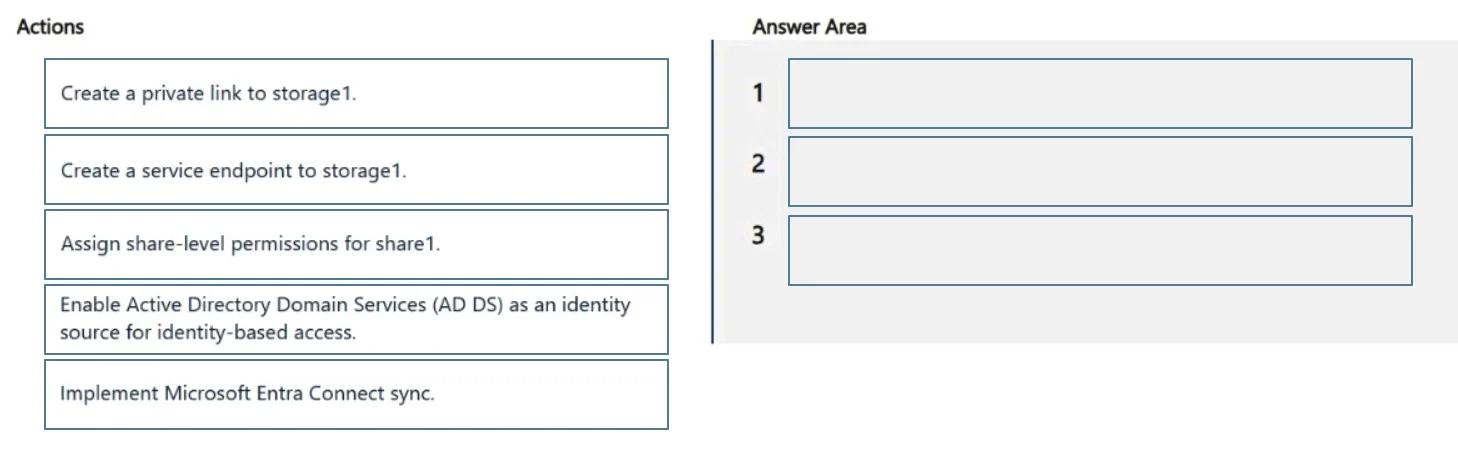
Answer Area
Drag items
Correct arrangement
- Enable Active Directory Domain Services (AD DS) as an identity source for identity-based access.
- Assign share-level permissions for share1.
- Create a service endpoint to storage1.
Explanation
To enable User1 to access share1 using on-premises AD DS credentials, you must first enable AD DS as the identity source for Azure Files on storage1, which registers the storage account in the on-premises domain. Next, you assign share-level permissions (IAM roles like Storage File Data SMB Share Contributor) so User1 is authorized to access share1. Finally, you create a service endpoint to storage1 so that the on-premises network can reach the storage account securely over the Microsoft backbone without exposing it to the public internet - this is the recommended network connectivity method for on-premises AD DS authentication scenarios where a private link is not required.
Topics
Community Discussion
No community discussion yet for this question.