
AZ-500 · Question #615
Hotspot Question You have an Azure subscription that contains the virtual networks shown in the following table. The virtual networks contain the subnets shown in the following table. You have the…
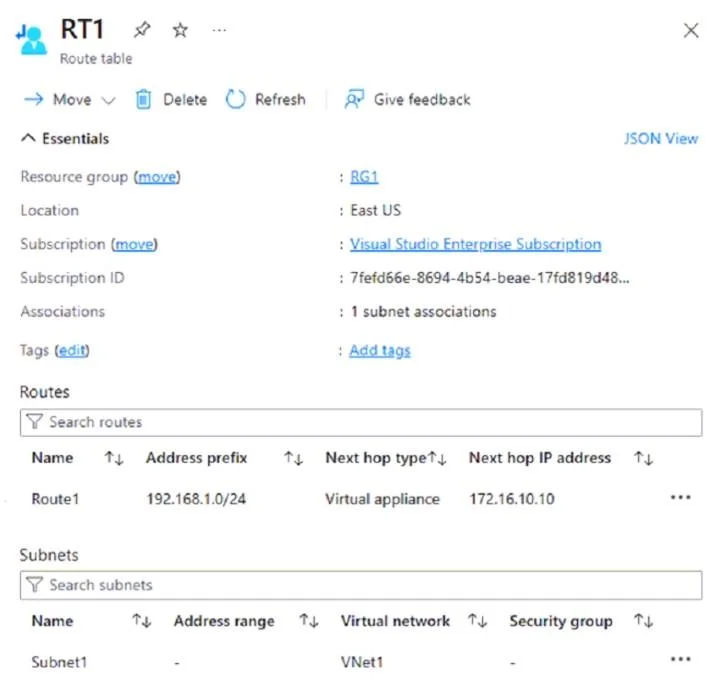
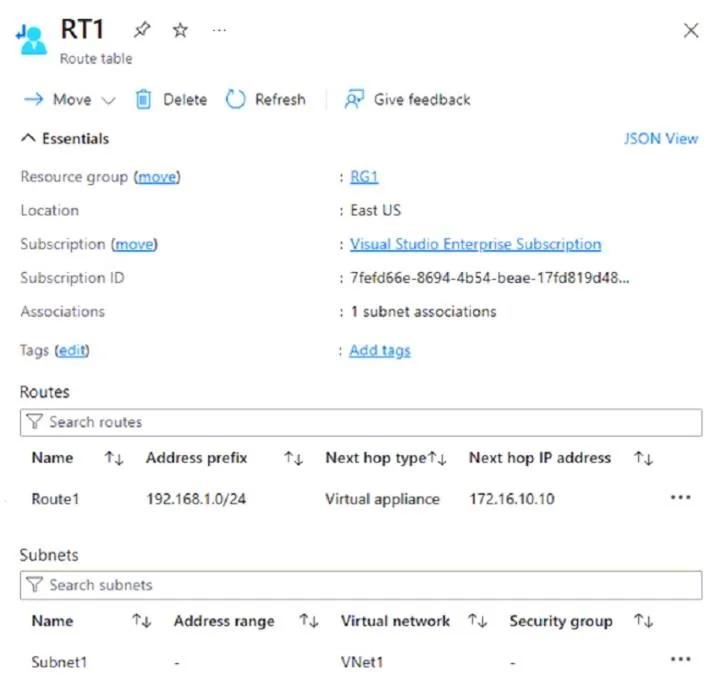
The correct answer is You can associate RT1 with Subnet3. = No; You can delete RT1. = No; When you attempt to ping VM2 from VM1, traffic is routed to 172.16.10.10. = Yes. RT1 cannot be associated with Subnet3 because route tables can only be associated with subnets within the same region/virtual network - if Subnet3 belongs to a different VNet or region than RT1, the association is blocked. RT1 cannot be deleted because it is already associated…
Question
Exhibits
Answer Area
- You can associate RT1 with Subnet3.No
- You can delete RT1.No
- When you attempt to ping VM2 from VM1, traffic is routed to 172.16.10.10.Yes
Explanation
RT1 cannot be associated with Subnet3 because route tables can only be associated with subnets within the same region/virtual network - if Subnet3 belongs to a different VNet or region than RT1, the association is blocked. RT1 cannot be deleted because it is already associated with at least one subnet (an in-use route table cannot be deleted without first removing all subnet associations). The ping from VM1 to VM2 is routed to 172.16.10.10 because RT1 contains a User Defined Route (UDR) that overrides the default system route for VM2's address range, directing traffic to the next-hop IP 172.16.10.10 (likely a Network Virtual Appliance).
Topics
Community Discussion
No community discussion yet for this question.