
AZ-500 · Question #59
Drag and Drop Question You have an Azure subscription named Sub1 that contains an Azure Storage account named Contosostorage1 and an Azure key vault named Contosokeyvault1. You plan to create an…
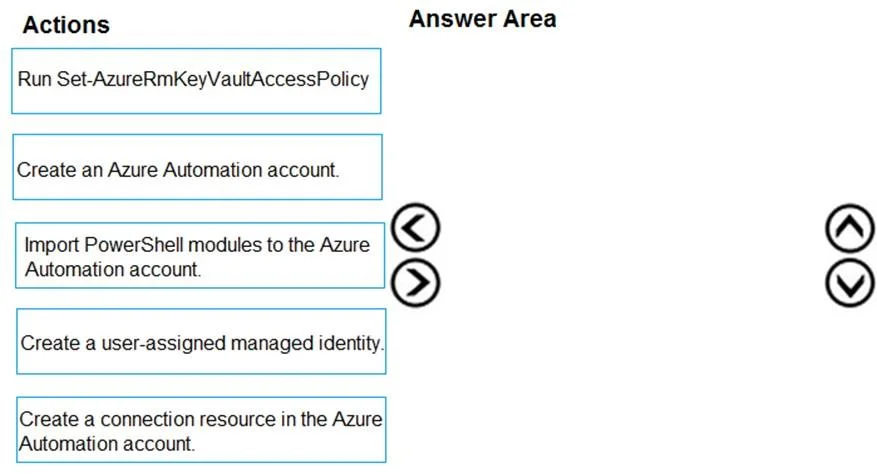
The correct answer is Create an Azure Automation account.; Import PowerShell modules to the Azure Automation account.; Create a connection resource in the Azure Automation account. To implement an Azure Automation runbook that rotates storage keys and stores them in Key Vault, you must first create an Azure Automation account (the foundational resource), then import the necessary PowerShell modules (such as Az.Accounts, Az.KeyVault, and Az.Storage) so the…
Question
Exhibit
Answer Area
Drag items
Correct arrangement
- Create an Azure Automation account.
- Import PowerShell modules to the Azure Automation account.
- Create a connection resource in the Azure Automation account.
Explanation
To implement an Azure Automation runbook that rotates storage keys and stores them in Key Vault, you must first create an Azure Automation account (the foundational resource), then import the necessary PowerShell modules (such as Az.Accounts, Az.KeyVault, and Az.Storage) so the runbook has the cmdlets it needs, and finally create a connection resource in the Automation account so the runbook can authenticate to Azure and interact with the target resources. These three steps establish the complete prerequisite infrastructure in the correct dependency order.
Topics
Community Discussion
No community discussion yet for this question.