
AZ-500 · Question #562
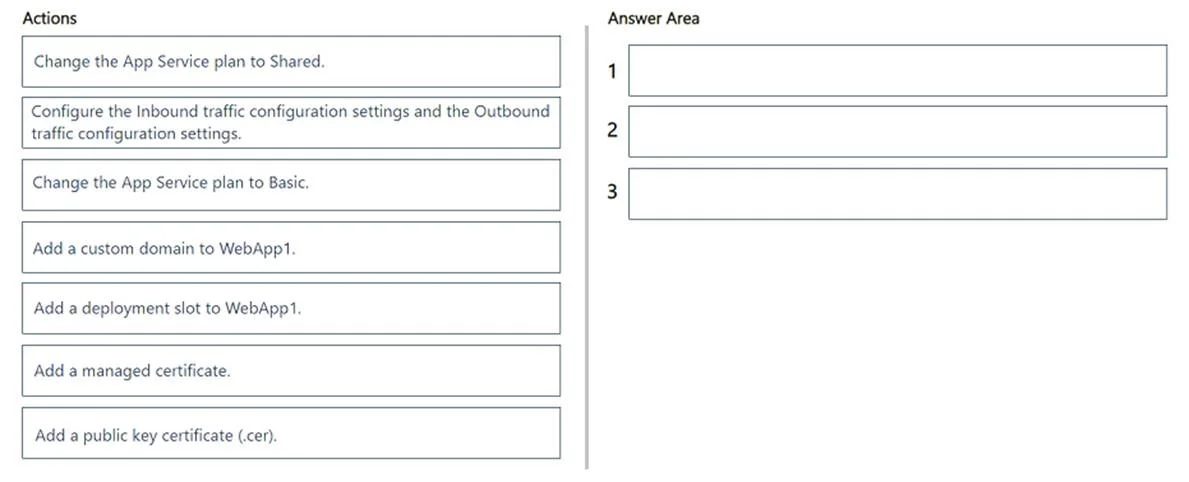
Drag and Drop Question You have an Azure subscription that contains the following Azure App Services app: - Name: WebApp1 - App Service plan: Free You need to configure WebApp1 to use an App Service…
The correct answer is Change the App Service plan to Basic.; Add a managed certificate.; Add a custom domain to WebApp1. To use an App Service managed certificate, the App Service plan must be at least Basic tier (Free and Shared tiers do not support managed certificates), so upgrading to Basic is the first required step. A custom domain must be added to WebApp1 before a managed certificate can…
Question
Exhibit
Answer Area
Drag items
Correct arrangement
- Change the App Service plan to Basic.
- Add a managed certificate.
- Add a custom domain to WebApp1.
Explanation
To use an App Service managed certificate, the App Service plan must be at least Basic tier (Free and Shared tiers do not support managed certificates), so upgrading to Basic is the first required step. A custom domain must be added to WebApp1 before a managed certificate can be issued, since managed certificates are bound to custom domains (not the default *.azurewebsites.net domain). Finally, after the custom domain is configured, the managed certificate can be added and bound to that custom domain - and managed certificates are free, satisfying the cost-minimization requirement.
Topics
Community Discussion
No community discussion yet for this question.