
AZ-500 · Question #556
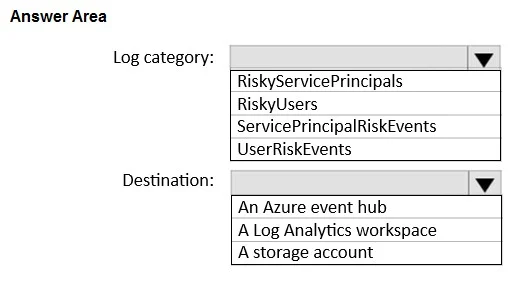
Hotspot Question You have an Azure subscription that is linked to a Microsoft Entra tenant. The tenant uses Microsoft Entra ID Protection. You have 2,000 users that are each assigned a Microsoft…
The correct answer is Log category:: ServicePrincipalRiskEvents; Destination:: A Log Analytics workspace. This question tests knowledge of Microsoft Entra ID Protection diagnostic settings, specifically which log category captures workload identity risk events (leaked credentials) and the optimal destination for Azure Monitor alerting.
Question
Exhibit
Answer Area
- Log category:ServicePrincipalRiskEventsRiskyServicePrincipalsRiskyUsersServicePrincipalRiskEventsUserRiskEvents
- Destination:A Log Analytics workspaceAn Azure event hubA Log Analytics workspaceA storage account
Explanation
This question tests knowledge of Microsoft Entra ID Protection diagnostic settings, specifically which log category captures workload identity risk events (leaked credentials) and the optimal destination for Azure Monitor alerting.
Approach. The correct log category to collect is 'RiskyServicePrincipals' (or 'ServicePrincipalRiskEvents'), as this category captures risk detections for workload identities (service principals), including leaked credentials scenarios. The correct destination is 'Log Analytics workspace', because Azure Monitor alerts are built on top of Log Analytics queries (KQL), making it the most direct and minimally complex path to generating alerts without additional data pipeline steps. Sending logs to a Log Analytics workspace allows you to create alert rules directly using Kusto Query Language against the ingested identity protection logs, which minimizes administrative effort compared to alternatives like Event Hub or Storage Account.
Concept tested. Microsoft Entra ID Protection Diagnostic Settings - specifically, identifying the correct log category for workload identity (service principal) risk events such as leaked credentials, and selecting Log Analytics workspace as the destination to enable Azure Monitor alert rules with minimal administrative overhead.
Reference. https://learn.microsoft.com/en-us/azure/active-directory/identity-protection/howto-export-risk-data
Topics
Community Discussion
No community discussion yet for this question.