
AZ-500 · Question #505
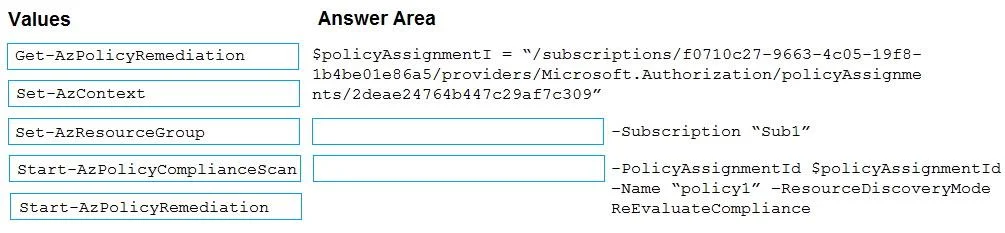
Drag and Drop Question You have two Azure subscriptions named Sub1 and Sub2. Sub1 contains a resource group named RG1 and an Azure policy named Policy1. You need to remediate the non-compliant…
The correct answer is Get-AzPolicyRemediation; Set-AzContext; Start-AzPolicyRemediation. The correct sequence uses Get-AzPolicyRemediation to retrieve existing remediation tasks and check the status of Policy1's compliance, Set-AzContext to switch the PowerShell session context to the correct subscription (Sub1), and Start-AzPolicyRemediation to actually trigger…
Question
Exhibit
Answer Area
Drag items
Correct arrangement
- Get-AzPolicyRemediation
- Set-AzContext
- Start-AzPolicyRemediation
Explanation
The correct sequence uses Get-AzPolicyRemediation to retrieve existing remediation tasks and check the status of Policy1's compliance, Set-AzContext to switch the PowerShell session context to the correct subscription (Sub1), and Start-AzPolicyRemediation to actually trigger the remediation process that brings non-compliant resources into compliance with Policy1. This three-step flow - retrieve policy info, set subscription context, then start remediation - is the standard Azure PowerShell pattern for policy remediation.
Topics
Community Discussion
No community discussion yet for this question.