
AZ-500 · Question #492
Hotspot Question You have an Azure subscription that contains the resources shown in the following table. SQL1 has the following configurations: - Auditing: Enabled - Audit log destination…
The correct answer is DB1 audit logs stored in:: storage2; DB2 audit logs stored in:: None. This question tests understanding of Azure SQL auditing inheritance - specifically how database-level auditing settings interact with server-level auditing settings, and where logs are ultimately stored.
Question
Exhibits
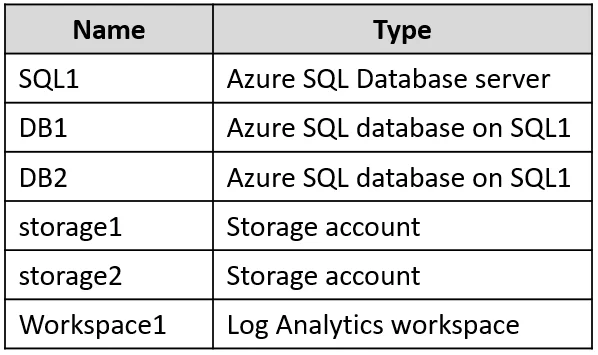
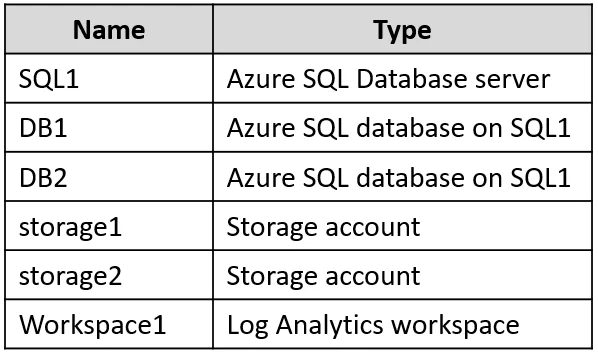
Answer Area
- DB1 audit logs stored in:storage2storage1storage2Workspace1None
- DB2 audit logs stored in:Nonestorage1storage2Workspace1None
Explanation
This question tests understanding of Azure SQL auditing inheritance - specifically how database-level auditing settings interact with server-level auditing settings, and where logs are ultimately stored.
Approach. DB1 has auditing explicitly enabled with its own destination (storage2), so its audit logs are stored in storage2 only - the database-level setting overrides the server-level setting for that database. DB2 has auditing disabled at the database level, but SQL1 (the server) has auditing enabled with destinations storage1 and Workspace1; when server-level auditing is enabled, it automatically audits all databases on the server regardless of whether the database has auditing disabled. Therefore, DB2's audit logs are stored in storage1 and Workspace1 (inherited from the server). The key rule is: if server auditing is ON, all databases are audited to the server destinations. If a database also has its OWN auditing enabled, logs go to BOTH the server destinations AND the database-level destination - but DB1's answer here depends on whether Microsoft considers it stored in storage2 only or storage2 plus server destinations. Per Microsoft documentation, when DB auditing is explicitly configured, logs go to the DB-level destination; server-level auditing still runs in parallel, so DB1 logs are stored in storage1, Workspace1, AND storage2, while DB2 logs are stored in storage1 and Workspace1.
Concept tested. Azure SQL Server and Database-level auditing inheritance: server-level auditing captures all databases (including those with auditing disabled), and database-level auditing adds an additional destination on top of server-level auditing destinations.
Reference. https://learn.microsoft.com/en-us/azure/azure-sql/database/auditing-overview
Topics
Community Discussion
No community discussion yet for this question.