
AZ-500 · Question #443
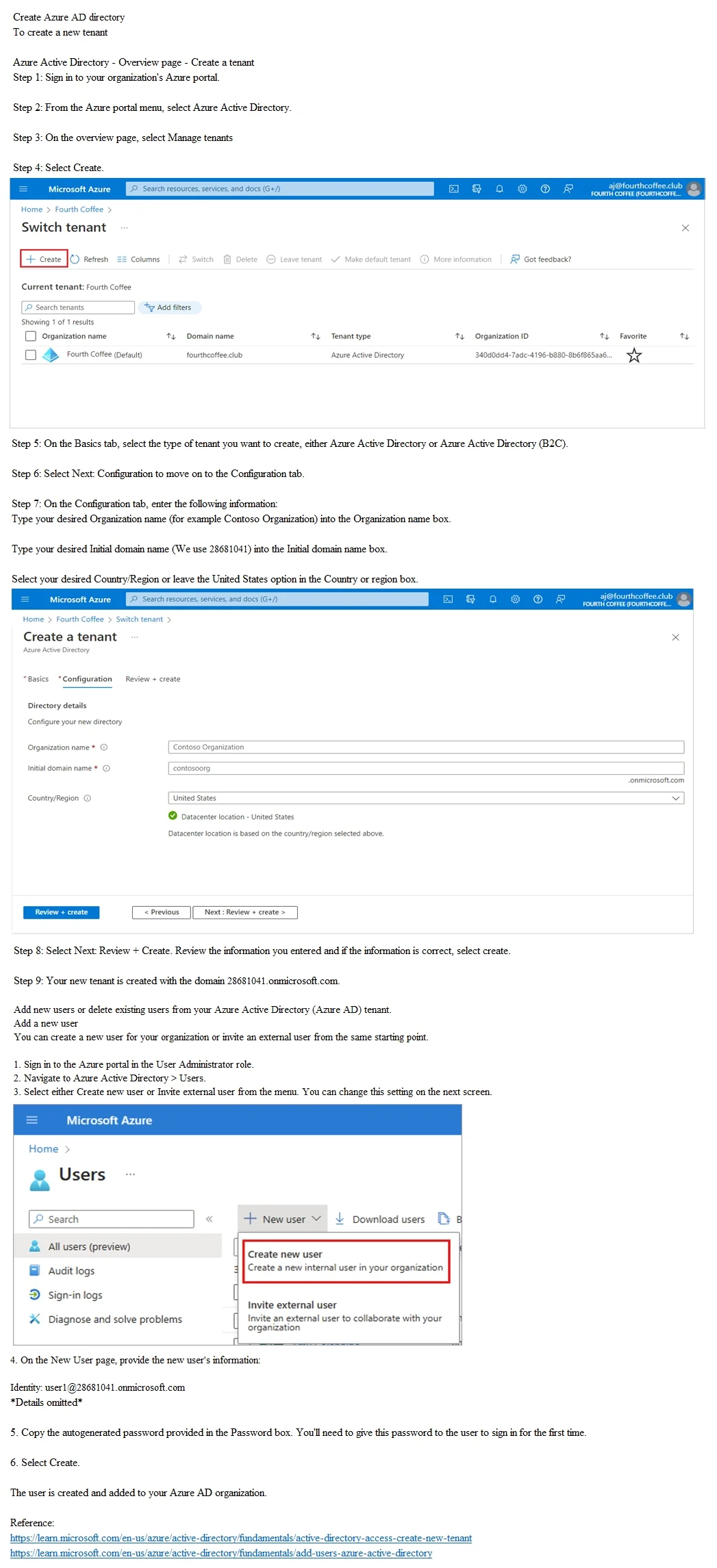
SIMULATION You need to create a new Azure AD directory named 28681041.onmicrosoft.com. The new directory must contain a new user named [email protected]. To complete this task, sign in…
The correct approach requires navigating to Azure Active Directory in the portal, creating a new tenant (directory) with the specific domain name 28681041.onmicrosoft.com, and then switching to that new tenant to create the user [email protected]. Creating a new…
Question
Exhibit
Explanation
The correct approach requires navigating to Azure Active Directory in the portal, creating a new tenant (directory) with the specific domain name 28681041.onmicrosoft.com, and then switching to that new tenant to create the user [email protected]. Creating a new Azure AD tenant is necessary because the new directory is a completely separate identity boundary from the default directory, and users must be created within the context of that new tenant to receive the correct UPN suffix. The steps follow the only supported workflow: resource creation → tenant setup → user provisioning within the new tenant.
Topics
Community Discussion
No community discussion yet for this question.