
AZ-500 · Question #439
Drag and Drop Question You have an Azure AD tenant and an application named App1. You need to ensure that App1 can use Microsoft Entra Verified ID to verify credentials. Which three actions should…
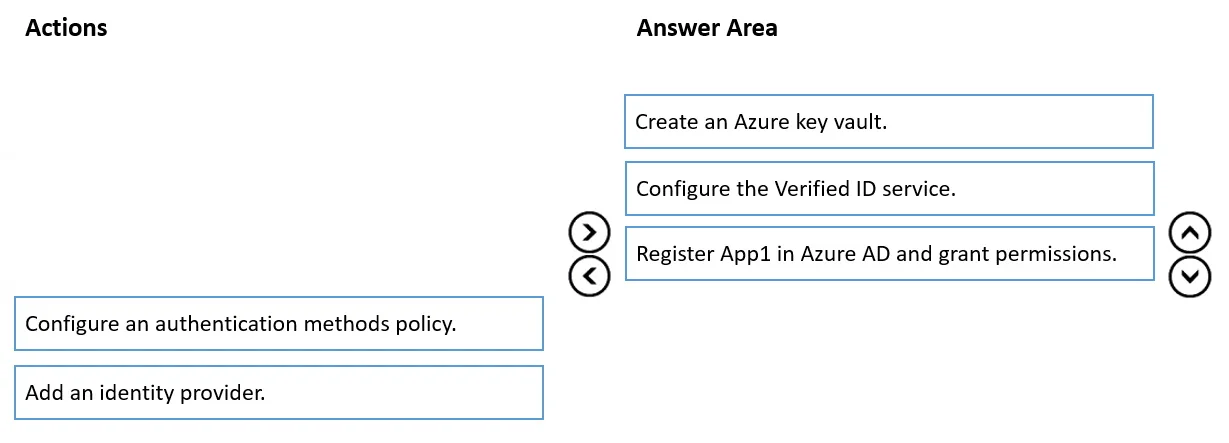
The correct answer is Create an Azure key vault.; Configure the Verified ID service.; Register App1 in Azure AD and grant permissions. To enable Microsoft Entra Verified ID for an application, you must first create an Azure Key Vault to securely store the cryptographic keys used for signing and verifying credentials. Next, you configure the Verified ID service, which requires the Key Vault to store its signing…
Question
Exhibit
Answer Area
Drag items
Correct arrangement
- Create an Azure key vault.
- Configure the Verified ID service.
- Register App1 in Azure AD and grant permissions.
Explanation
To enable Microsoft Entra Verified ID for an application, you must first create an Azure Key Vault to securely store the cryptographic keys used for signing and verifying credentials. Next, you configure the Verified ID service, which requires the Key Vault to store its signing keys and DID (Decentralized Identifier) document. Finally, you register App1 in Azure AD and grant it the necessary API permissions so it can interact with the Verified ID service to issue or verify credentials.
Topics
Community Discussion
No community discussion yet for this question.