
AZ-500 · Question #428
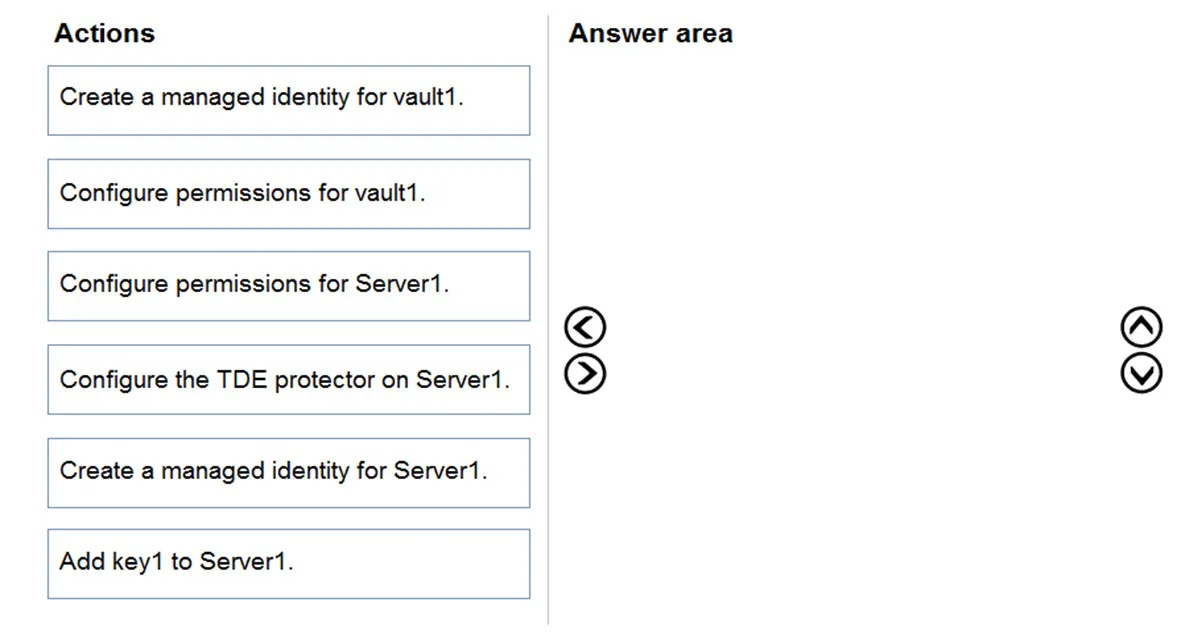
Drag and Drop Question You have an Azure subscription that contains a Microsoft SQL server named Server1 and an Azure key vault named vault1. Server1 hosts a database named DB1. Vault1 contains an…
The correct answer is Create a managed identity for vault1.; Configure permissions for Server1.; Add key1 to Server1.; Configure the TDE protector on Server1. To enable TDE with a customer-managed key (CMK) from Azure Key Vault, you must first create a managed identity for Server1 (not vault1) so the SQL server has an identity to authenticate with. Then configure permissions on vault1 to grant Server1's managed identity the necessary…
Question
Exhibit
Answer Area
Drag items
Correct arrangement
- Create a managed identity for vault1.
- Configure permissions for Server1.
- Add key1 to Server1.
- Configure the TDE protector on Server1.
Explanation
To enable TDE with a customer-managed key (CMK) from Azure Key Vault, you must first create a managed identity for Server1 (not vault1) so the SQL server has an identity to authenticate with. Then configure permissions on vault1 to grant Server1's managed identity the necessary Key Vault access (Get, Wrap Key, Unwrap Key). Next, add key1 to Server1 so it references the key vault key, and finally configure the TDE protector on Server1 to use key1 as the encryption protector. The correct sequence follows the logical dependency chain: identity → permissions → key reference → TDE activation.
Topics
Community Discussion
No community discussion yet for this question.