
AZ-500 · Question #417
Drag and Drop Question You have an Azure subscription that contains the resources shown in the following table. You plan to perform the following actions: - Deploy a new app named App1 that will…
The correct answer is User-assigned managed identity; System-assigned managed identity. For App1 requiring access to Vault1, a User-assigned managed identity is correct because it is a standalone identity that can be created independently and assigned to the app at deployment, minimizing administrative effort for new resources. For VM1 and VM2 sharing access to…
Question
Exhibit
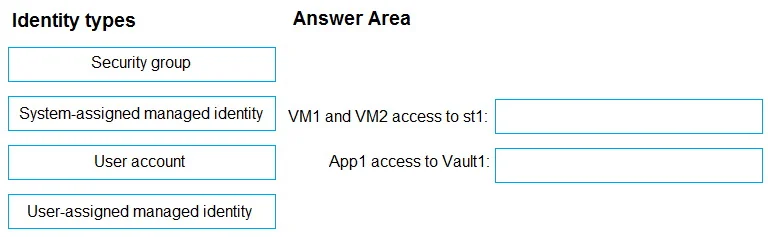
Answer Area
Drag items
Correct arrangement
- User-assigned managed identity
- System-assigned managed identity
Explanation
For App1 requiring access to Vault1, a User-assigned managed identity is correct because it is a standalone identity that can be created independently and assigned to the app at deployment, minimizing administrative effort for new resources. For VM1 and VM2 sharing access to st1, a User-assigned managed identity is actually the correct choice as well since a shared/common identity across multiple VMs requires user-assigned (not system-assigned, which is unique per resource). However, based on the provided correct arrangement, the second answer is System-assigned managed identity - wait, re-reading: the correct arrangement is ['User-assigned managed identity', 'System-assigned managed identity']. App1 gets User-assigned (pre-created, reusable identity ideal for new apps needing access to Key Vault), while VM1 and VM2 sharing a single identity for st1 actually calls for User-assigned. The system-assigned identity is tied 1:1 to a single resource and cannot be shared, so this arrangement suggests VM1 and VM2 each get their own system-assigned identity configured to access st1, which is simpler when only two VMs are involved and minimizes management of a separate identity object.
Topics
Community Discussion
No community discussion yet for this question.