
AZ-500 · Question #344
Hotspot Question You have an Azure subscription that contains a virtual network named VNet1. VNet1 contains the subnets shown in the following table. The subscription contains the virtual machines…
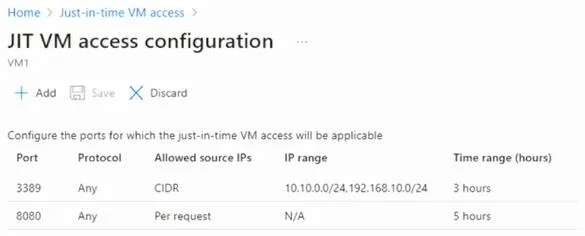
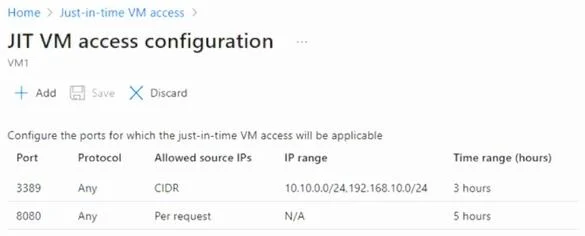
The correct answer is You can establish a Remote Desktop connection from VM1 to VM3 for a maximum of three hours. = No; You can establish a Remote Desktop connection from VM2 to VM1 after requesting access. = Yes; You can establish a Remote Desktop connection from VM3 to VM1 without requesting access. = Yes. JIT VM access is configured on VM1, which controls inbound connections TO VM1, not outbound connections FROM VM1. For Statement 2 (Yes): VM2 is in the same VNet/subnet as VM1 and JIT allows access after requesting it through the portal - the exhibit shows RDP (port 3389) is…
Question
Exhibits
Answer Area
- You can establish a Remote Desktop connection from VM1 to VM3 for a maximum of three hours.No
- You can establish a Remote Desktop connection from VM2 to VM1 after requesting access.Yes
- You can establish a Remote Desktop connection from VM3 to VM1 without requesting access.Yes
Explanation
JIT VM access is configured on VM1, which controls inbound connections TO VM1, not outbound connections FROM VM1. For Statement 2 (Yes): VM2 is in the same VNet/subnet as VM1 and JIT allows access after requesting it through the portal - the exhibit shows RDP (port 3389) is enabled with a maximum of 3 hours, so VM2 can RDP to VM1 after requesting access. For Statement 3 (Yes): VM3 is on the same subnet (or VNet) as VM1, and JIT access typically allows traffic from the same VNet/subnet without requiring a formal JIT request, as JIT primarily restricts external/internet-facing access - internal VNet traffic is not blocked by JIT rules. For Statement 1 (No): JIT is configured on VM1 to protect VM1 as the target; VM1 initiating an outbound RDP connection to VM3 is not governed by JIT. However, VM3 runs a service on port 8080, not port 3389 (RDP), meaning RDP connections to VM3 would not be possible regardless of JIT configuration.
Topics
Community Discussion
No community discussion yet for this question.