
AZ-500 · Question #290
Hotspot Question You have an Azure subscription named Subscription1 that contains a resource group named RG1 and a user named User1. User1 is assigned the Owner role for RG1. You create an Azure…
The correct answer is A locking mode of Read Only will be assigned to RG1. = Yes; User1 can add tags to RG2. = No; You can remove User1 from the Tag Contributor role for RG2. = Yes. Azure Blueprints - Hotspot Explanation Setup Summary Subscription1 contains existing RG1 and User1 (Owner of RG1) Blueprint1 deploys RG2 as a resource group artifact (and per the exhibit, also targets/includes RG1) Assignment settings: Lock = Read Only, Identity = System…
Question
Exhibits
Answer Area
- A locking mode of Read Only will be assigned to RG1.Yes
- User1 can add tags to RG2.No
- You can remove User1 from the Tag Contributor role for RG2.Yes
Explanation
Azure Blueprints - Hotspot Explanation
Setup Summary
- Subscription1 contains existing RG1 and User1 (Owner of RG1)
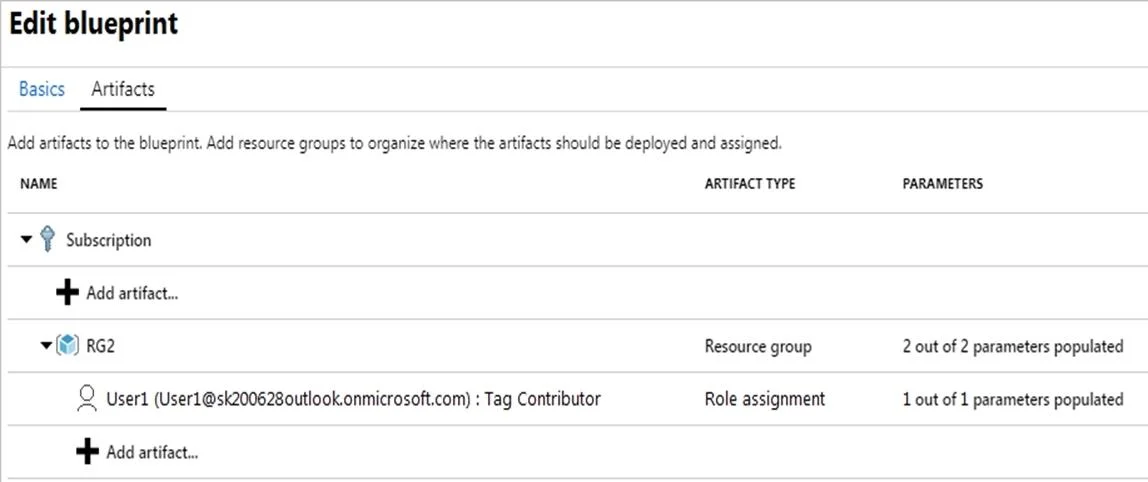
- Blueprint1 deploys RG2 as a resource group artifact (and per the exhibit, also targets/includes RG1)
- Assignment settings: Lock = Read Only, Identity = System Assigned
Statement 1: "A locking mode of Read Only will be assigned to RG1." -> Yes
Why: Azure Blueprint lock modes apply to all resources managed as artifacts of the blueprint assignment. The exhibit shows Blueprint1 includes RG1 as a resource group artifact (not just RG2). Because the blueprint manages RG1, the Read Only lock is applied to it at assignment time - regardless of the fact that RG1 pre-existed.
Key concept: Blueprint locks apply at the artifact level within the assignment scope. If a resource group is listed as a blueprint artifact, it gets locked.
Statement 2: "User1 can add tags to RG2." -> No
Why: Two reasons stack here:
- User1's Owner role is scoped to RG1, not RG2 - so User1 has no elevated permissions on RG2 by default.
- Even if User1 did have write access on RG2, the Read Only blueprint lock blocks all write operations, including adding tags (tags are a PATCH/PUT operation on the resource).
Key concept: Blueprint Read Only locks supersede RBAC - even a Subscription Owner cannot modify a Read Only-locked blueprint resource's configuration. Tags count as a modification.
Statement 3: "You can remove User1 from the Tag Contributor role for RG2." -> Yes
Why: Blueprint lock modes (Read Only, Don't Delete) protect resource state and configuration, but they do not lock RBAC role assignments. Role assignments operate in the Azure authorization/management plane, which sits outside the scope of blueprint resource locks. An administrator with sufficient permissions can still add or remove role assignments on RG2 even under a Read Only lock.
Key concept: Blueprint locks ≠ blocking RBAC management. Locks protect what the resource does, not who can access it.
Memory Tips
| Concept | Protected by Read Only Blueprint Lock? |
|---|---|
| Resource configuration | Yes |
| Adding/modifying tags | Yes (write op) |
| Deleting the resource | Yes |
| RBAC role assignments | No - manage freely |
Mnemonic: "Blueprint locks freeze the resource, not the roster." You can always change who has access; you just can't change what the resource looks like.
Blueprint lock vs. Azure Resource Lock: Don't confuse these. Azure Resource Locks (CanNotDelete/ReadOnly) are applied directly in the portal/CLI. Blueprint locks are enforced by the blueprint service and are removed when the blueprint assignment is removed.
Topics
Community Discussion
No community discussion yet for this question.