
AZ-500 · Question #288
Hotspot Question You have an Azure Active Directory (Azure AD) tenant named contoso.com that contains three security groups named Group1, Group2, and Group3 and the users shown in the following…
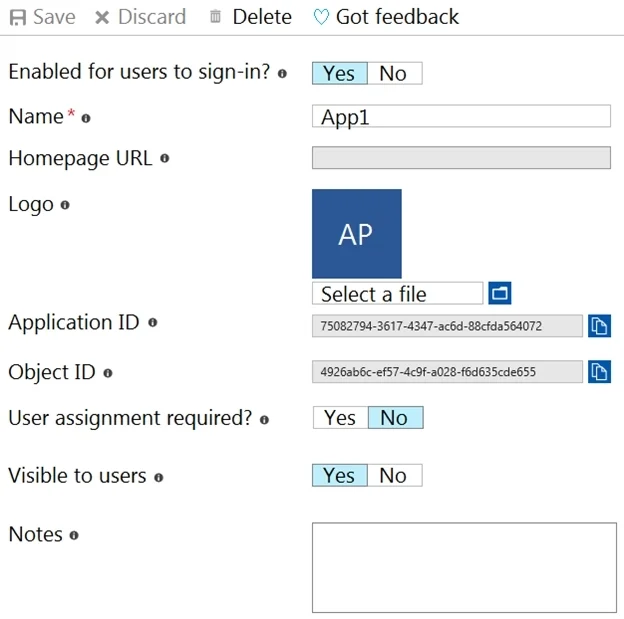
The correct answer is App1 is enabled for users to sign-in. = Yes; User assignment is required for App1. = No; App1 is visible to users. = Yes. Based on the exhibit described, App1 has 'Enabled for users to sign-in' set to Yes (enabled), making the first statement true. The 'User assignment required' property is set to No, meaning any user can access the app without being explicitly assigned, making the second…
Question
Exhibits


Answer Area
- App1 is enabled for users to sign-in.Yes
- User assignment is required for App1.No
- App1 is visible to users.Yes
Explanation
Based on the exhibit described, App1 has 'Enabled for users to sign-in' set to Yes (enabled), making the first statement true. The 'User assignment required' property is set to No, meaning any user can access the app without being explicitly assigned, making the second statement false. The 'Visible to users' property is set to Yes, meaning App1 appears in the My Apps portal and Microsoft 365 app launcher, making the third statement true. These three properties in Azure AD Enterprise Applications control access behavior, assignment enforcement, and portal visibility independently of one another.
Topics
Community Discussion
No community discussion yet for this question.