
AZ-500 · Question #236
Hotspot Question You have 20 Azure subscriptions and a security group named Group1. The subscriptions are children of the root management group. Each subscription contains a resource group named…
Azure Subscription RBAC & Lock Management - Hotspot Explanation --- Dropdown 1: Configure RBAC role assignments by using... Correct Answer: Azure Blueprints Why Blueprints is correct: Azure Blueprints lets you define a repeatable package of governance artifacts - including RBAC…
Question
Exhibit
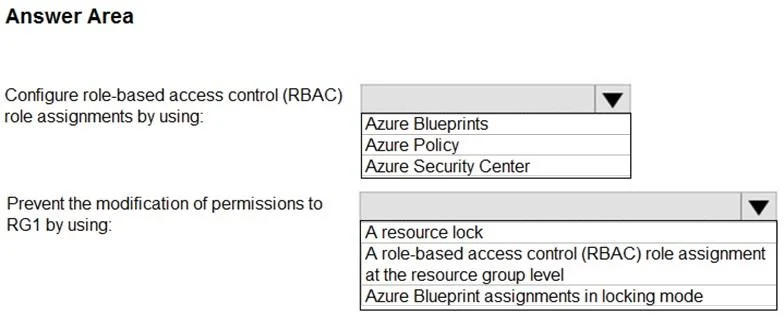
Answer Area
- Configure role-based access control (RBAC) role assignments by using:Azure BlueprintsAzure PolicyAzure Security Center
- Prevent the modification of permissions to RG1 by using:A resource lockA role-based access control (RBAC) role assignment at the resource group levelAzure Blueprint assignments in locking mode
Explanation
Azure Subscription RBAC & Lock Management - Hotspot Explanation
Dropdown 1: Configure RBAC role assignments by using...
Correct Answer: Azure Blueprints
Why Blueprints is correct: Azure Blueprints lets you define a repeatable package of governance artifacts - including RBAC role assignments - and deploy them consistently across multiple subscriptions at once. You can include a role assignment (Group1 -> Owner -> RG1) in a blueprint definition and assign it to all 20 subscriptions in one operation. Blueprints are specifically designed for this "deploy governance at scale" scenario.
Why the others are wrong:
- Azure Policy - Enforces compliance rules on resource properties (e.g., require tags, restrict SKUs). It cannot create or manage RBAC role assignments.
- Azure Security Center (Defender for Cloud) - A security posture/threat detection tool. It has no capability to assign RBAC roles to resource groups.
Dropdown 2: Prevent modification of permissions to RG1 by using...
Correct Answer: Azure Blueprint assignments in locking mode
Why Blueprint locking is correct: When a blueprint is assigned with locking mode enabled, Azure creates deny assignments on the managed resources. These deny assignments block even Owners and subscription admins from modifying or deleting what the blueprint deployed - including the RBAC role assignments. This is the only mechanism that actively prevents permission modification rather than just setting permissions.
Why the others are wrong:
- A resource lock (CanNotDelete / ReadOnly) - Resource locks protect resource properties and deletion at the ARM resource level. They do not block changes to RBAC role assignments, which operate at the control plane's authorization layer independently of locks.
- An RBAC role assignment at the resource group level - Assigning a role grants access; it does nothing to prevent someone from modifying the permission structure. An Owner can still go in and change role assignments afterward.
Key Concept Summary
| Requirement | Solution | Why |
|---|---|---|
| Assign Owner to Group1 across 20 subs | Azure Blueprints | Deploys RBAC assignments at scale across subscriptions |
| Prevent permission modification | Blueprint locking mode | Creates deny assignments that block even admins from overriding blueprint-managed resources |
The two answers work together: deploy the role assignment via a blueprint, then lock that blueprint assignment to make it tamper-proof.
Topics
Community Discussion
No community discussion yet for this question.