nerdexam
Microsoft

AZ-500 · Question #119

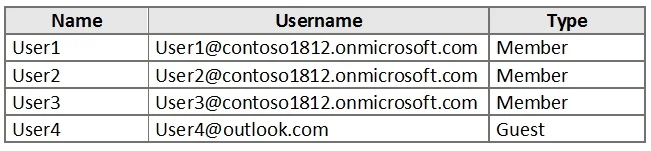
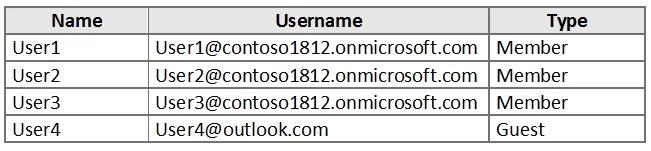
Hotspot Question You have an Azure Active Directory (Azure AD) tenant named contoso1812.onmicrosoft.com that contains the users shown in the following table. You create an Azure Information…

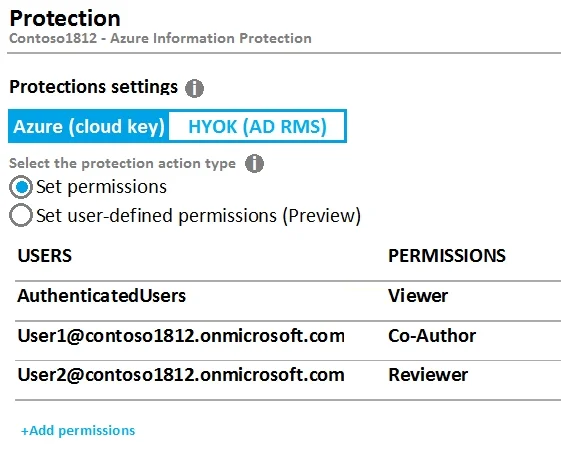
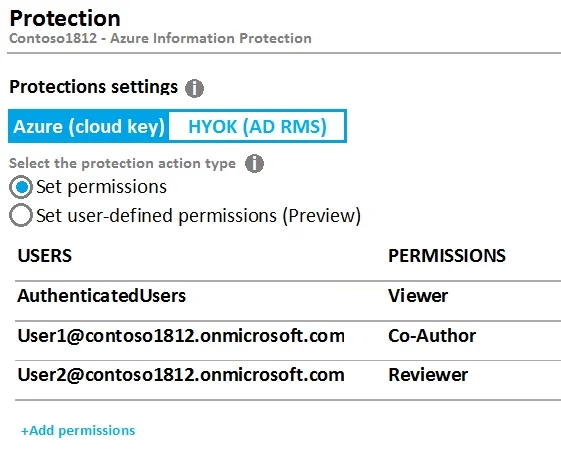
The correct answer is User1 can print File1. = Yes; User3 can read File1. = Yes; User4 can print File1. = No. Based on the AIP Label1 protection settings exhibit, specific users are granted defined permissions. User1 is typically configured as a Co-Author or has explicit Print rights, allowing them to print File1. User3 is granted Reviewer or Reader rights which include the ability to…

Submitted by obi.ng· Mar 6, 2026Implement and manage information protection in Microsoft Azure / Microsoft 365 - specifically configuring Azure Information Protection labels, understanding permission levels (Owner, Co-Author, Reviewer, Viewer), and determining user access rights based on applied protection policies. This aligns with the AZ-500 (Azure Security Engineer) or SC-400 (Microsoft Information Protection Administrator) certification domain on 'Implement information protection'.

Question

Hotspot Question You have an Azure Active Directory (Azure AD) tenant named contoso1812.onmicrosoft.com that contains the users shown in the following table. You create an Azure Information Protection label named Label1. The Protection settings for Label1 are configured as shown in the exhibit. (Click the Exhibit tab.) Label1 is applied to a file named File1. For each of the following statements, select Yes if the statement is true, Otherwise, select No. NOTE: Each correct selection is worth one point. Answer:

Exhibits

AZ-500 question #119 exhibit 1
AZ-500 question #119 exhibit 2
AZ-500 question #119 exhibit 3
AZ-500 question #119 exhibit 4

Answer Area

  • User1 can print File1.Yes
  • User3 can read File1.Yes
  • User4 can print File1.No

Explanation

Based on the AIP Label1 protection settings exhibit, specific users are granted defined permissions. User1 is typically configured as a Co-Author or has explicit Print rights, allowing them to print File1. User3 is granted Reviewer or Reader rights which include the ability to read/view the file. User4, however, is only granted Reviewer-level permissions (which include Read and Reply but NOT Print), so User4 cannot print File1 - making that statement correctly 'No'.

Topics

#Azure Information Protection#AIP Label Permissions#Azure AD Identity Management#Data Protection and Rights Management

Community Discussion

No community discussion yet for this question.

Full AZ-500 Practice