
AZ-400 · Question #61
Hotspot Question Your company uses Team Foundation Server 2013 (TFS 2013). You plan to migrate to Azure DevOps. You need to recommend a migration strategy that meets the following requirements…
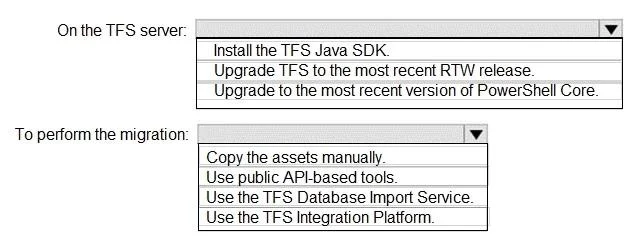
The correct answer is On the TFS server:: Upgrade TFS to the most recent RTW release.; To perform the migration:: Use the TFS Database Import Service. This question tests knowledge of TFS to Azure DevOps migration tools and their capabilities, specifically around preserving historical data such as changeset dates and work item revision dates.
Question
Exhibit
Answer Area
- On the TFS server:Upgrade TFS to the most recent RTW release.Install the TFS Java SDK.Upgrade TFS to the most recent RTW release.Upgrade to the most recent version of PowerShell Core.
- To perform the migration:Use the TFS Database Import Service.Copy the assets manually.Use public API-based tools.Use the TFS Database Import Service.Use the TFS Integration Platform.
Explanation
This question tests knowledge of TFS to Azure DevOps migration tools and their capabilities, specifically around preserving historical data such as changeset dates and work item revision dates.
Approach. The correct recommendation is to use the Azure DevOps Migration Tool (specifically the TFS Database Import Service / Azure DevOps Migration Service) which performs a high-fidelity migration. For preserving TFVC changeset dates, you should use the TFS Database Import Service (also known as the Data Migration Tool for Azure DevOps), which does a full database-level migration and preserves all historical timestamps. For preserving work item revision change dates, the same Database Import Service preserves these natively since it migrates at the database level rather than through APIs. This approach minimizes effort and migrates ALL TFS artifacts (including work items, TFVC history, build definitions, test plans, etc.) because it works at the SQL database level, making it a high-fidelity, complete migration rather than a selective API-based migration.
Concept tested. Understanding of TFS to Azure DevOps migration strategies: specifically the difference between the TFS Database Import Service (high-fidelity, preserves dates, migrates everything) versus API-based tools like the VSTS Sync Migrator or manual export/import methods (which may not preserve timestamps or migrate all artifact types). The Database Import Service is the only Microsoft-supported method that preserves changeset dates and work item revision dates while migrating all artifacts with minimal effort.
Reference. https://docs.microsoft.com/en-us/azure/devops/migrate/migration-overview
Topics
Community Discussion
No community discussion yet for this question.