
AZ-400 · Question #533
SIMULATION Initialize the default main branch, if it does not exist already. For Project1, you need to implement branch merging restrictions to enable squash merge for all changes merged into the…
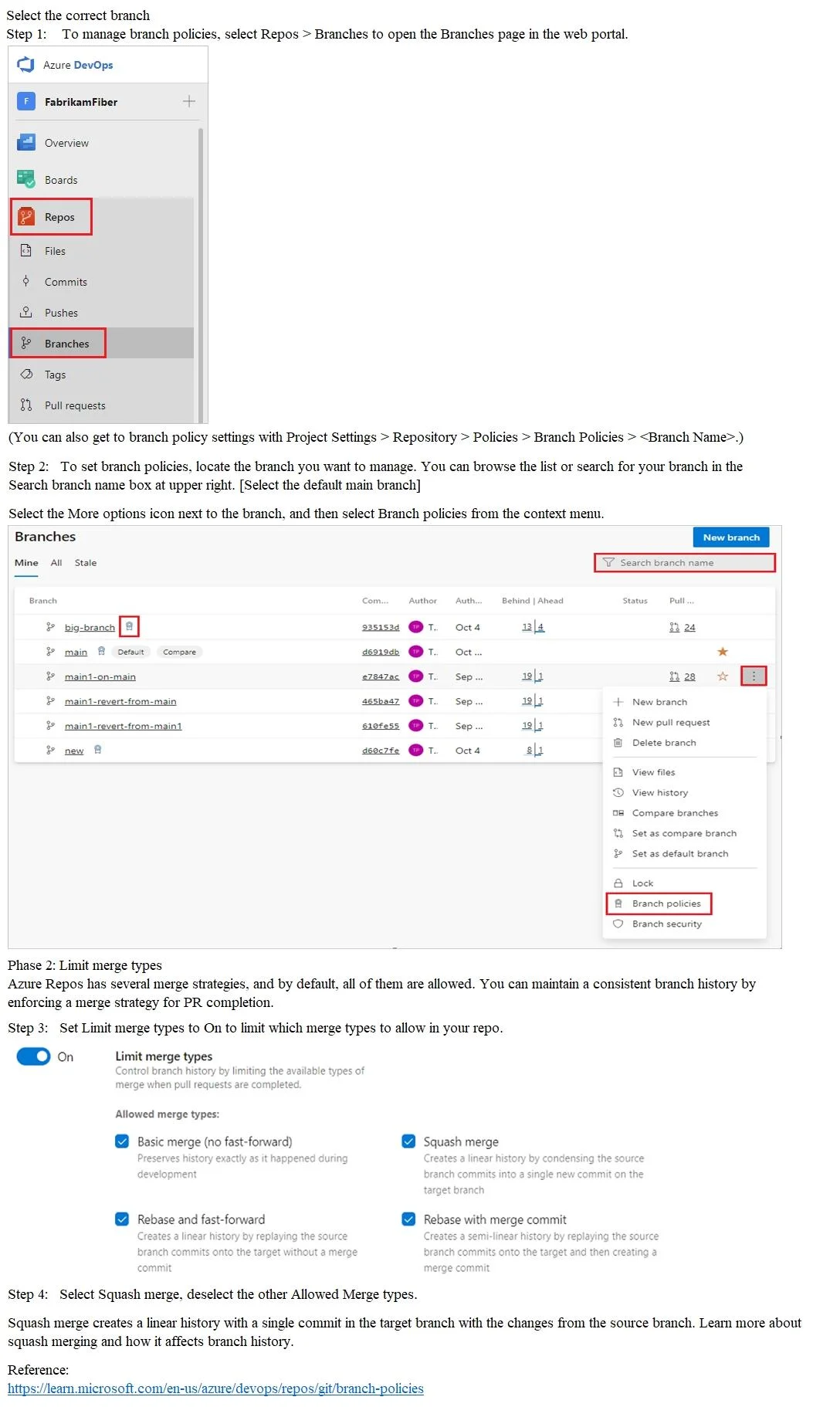
The correct answer requires navigating to Repos > Branches in Azure DevOps, locating the main branch for Project1, and accessing Branch Policies to configure Merge Strategies. By enabling only 'Squash merge' in the Merge Strategies section, all pull requests merging into main…
Question
Exhibit
Explanation
The correct answer requires navigating to Repos > Branches in Azure DevOps, locating the main branch for Project1, and accessing Branch Policies to configure Merge Strategies. By enabling only 'Squash merge' in the Merge Strategies section, all pull requests merging into main will be required to use squash commits, compressing the source branch history into a single commit on the target branch. This is the proper Azure DevOps workflow because branch policies are the designated mechanism for enforcing merge strategy restrictions at the repository level.
Topics
Community Discussion
No community discussion yet for this question.